Add a per-product surcharge with a function
Background
Some products carry an extra fee on top of their price, such as a customization fee for an engraved item or a packaging fee for a fragile one. The fee differs from product to product. Shoplazza keeps a product's price on the variant, so without a function the merchant can only build the fee into the variant price, and that leaves three problems:
- The product page shows the price with the fee already included, so the buyer sees a higher listed price and cannot tell how much of it is the fee;
- Every time a fee changes, the merchant has to edit the variant price of each affected product by hand, and the fee and the price drift out of sync;
- At checkout the buyer sees one combined price, with nothing that says a fee was added.
All three come from the same root cause: the price the buyer pays is the variant price, and nothing between adding to cart and paying lets an app add a per-product amount on top of it. So the goal here is to keep the listed price as it is, store the fee on each product, and add it to the line price only in the cart and at checkout, with the fee shown next to the product title at checkout.
How it works
- The merchant sets the fee: on install, your app creates a product metafield definition,
custom.markupin this example. A metafield is a custom field you attach to a resource such as a product. The merchant then enters an integer fee in that field for each product that carries one, and leaves it empty for the rest. - The app declares what the function reads: the function's
shoplazza.extension.tomllistscustom.markupin[[metafields_query]].app deploysubmits this declaration with the function. - The platform binds the function on install: when a merchant installs the app, the platform binds the published function to the store, together with the declaration.
- The buyer adds a product to cart: the platform runs the function with the cart as input. Each line item carries the
custom.markupvalue of its product inproduct.metafields. - The function returns the adjustment: for each line that has a fee, the function returns
adjustment_fixed_priceequal to the fee and a new title. Lines without a fee are left out of the output. - The platform applies it: the line's unit price becomes the original price plus
adjustment_fixed_price. The function runs again when checkout is created, before any discount, and the new title shows at checkout.
The overall flow:
Example walkthrough
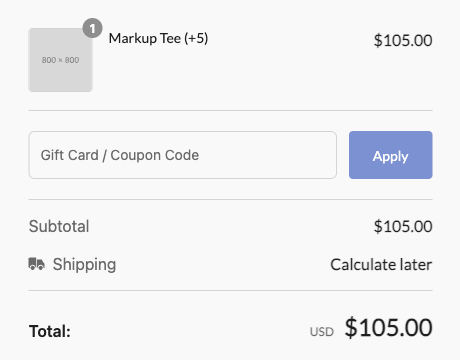
The rest of this page builds the function step by step. A product listed at 100 with custom.markup = 5 shows 105 in the cart and at checkout, and its checkout title reads Markup Tee (+5). A product without the metafield keeps its price.
Prerequisites
- An app project created with
shoplazza app init. See Build your first app. - Shoplazza CLI 2.2.5 or later. Earlier versions do not submit the
[[metafields_query]]declaration, so the function receives no metafields. write_cart_transformin thescopesofshoplazza.app.toml. The default app template already includes it.- A test store to install the app on.
For how a function is compiled, published, and bound in general, see the Function extension development guide.
Step 1: Create the metafield definition when the app is installed
A metafield definition declares a field's namespace, key, and type for one kind of resource. Once a product metafield definition exists, the field shows up at the bottom of every product's edit page in the store admin, ready for the merchant to fill in.
Have your app create the definition through the API when it is installed, instead of asking the merchant to create it by hand. The function only reads the namespace and key it declares. If a merchant types either one wrong, the function finds no fee, prices stay unchanged, and nothing reports an error. Creating the definition in code keeps the name the same in the definition, the declaration, and the function.
Add a new product metafield to hold the fee, for example custom.markup as used throughout this page. The name is up to you. Whatever namespace and key you choose, use the same pair in the declaration in Step 3 and in the function code in Step 4.
POST /openapi/2026-01/metafield_definition/product
Request body:
{
  "namespace": "custom",
  "key": "markup",
  "name": "Markup",
  "type": "integer",  // the fee is a whole number
  "description": "Amount added to the product price in the cart and at checkout"
}
Response (excerpt, the new definition under data.metafield_definition):
{
  "code": "Success",
  "data": {
    "metafield_definition": {
      "id": "705345636089727677",
      "namespace": "custom",
      "key": "markup",
      "name": "Markup",
      "owner_resource": "product",
      "type": "integer"
    }
  }
}
The definition belongs to the store, so create it once per store. For every field, see Create metafield definition.
After that, the merchant sets the fee: in the store admin, open the edit page of each product that carries a fee and enter the amount in the Markup field at the bottom. Products without a fee leave it empty. If your app has its own settings page and you want merchants to enter fees there, your app can write the values with Create metafield instead.
Step 2: Create the function extension
From the app project root, scaffold a function extension named markup-price:
shoplazza app extension create --type function --name markup-price
This creates:
extensions/
└── markup-price/
    ├── .gitignore
    ├── package.json
    ├── shoplazza.extension.toml   # extension config
    └── src/
        └── index.js               # function entry point
Step 3: Declare the metafield the function reads
A function only receives the metafields it declares. Add a [[metafields_query]] block to extensions/markup-price/shoplazza.extension.toml:
id = ""
name = "markup-price"
type = "function"

# Load the product metafield custom.markup into each line's product.metafields
[[metafields_query]]
resource = "product"
namespace = "custom"
key = "markup"
resource:productorshop. Product metafields appear under each line'sproduct.metafields;namespaceandkey: must match the definition from Step 1;- A function can declare up to 5 entries.
app deploychecks the declaration and fails if it is invalid.
Without this block the function still runs, but product.metafields is an empty array []. The function then finds no fee and every price stays unchanged, with no error anywhere. If prices do not change, check this block first.
Step 4: Write the function logic
The function reads the cart from stdin and writes its result to stdout. The scaffolded src/index.js already contains readInput() and writeOutput(), which handle that reading and writing. Keep them, and replace run() with the logic below:
// extensions/markup-price/src/index.js

const input = readInput();
const result = run(input);
writeOutput(result);

function run(input) {
  // Collect one price update per line that carries a fee
  const update = [];

  input.cart.line_items.forEach((lineItem) => {
    // Metafields declared in [[metafields_query]]. An empty array if nothing was declared.
    const metafields = lineItem.product.metafields || [];

    // Find this product's fee: the metafield with namespace custom and key markup
    const markupField = metafields.find(
      (metafield) => metafield.namespace === "custom" && metafield.key === "markup"
    );

    // No fee on this product: leave the line out of the output, so it keeps its original price
    if (!markupField) {
      return;
    }

    // parseFloat accepts both a number and a numeric string
    const markup = parseFloat(markupField.value);

    // adjustment_fixed_price must be between 0 and 999999999.
    // The platform rejects the whole output if any single line is invalid, so skip bad values here.
    if (!Number.isFinite(markup) || markup < 0 || markup > 999999999) {
      return;
    }

    update.push({
      // The line to change: use the line item id from the input
      id: lineItem.id,
      price: {
        // The amount added to the original unit price, as a string with 2 decimals.
        // Final unit price = original price + adjustment_fixed_price.
        adjustment_fixed_price: markup.toFixed(2),
      },
      // The new line title. It shows at checkout; the cart page keeps the original title.
      title: `${lineItem.product.product_title} (+${markup})`,
    });
  });

  // update is the only supported operation
  return { operation: { update } };
}

// readInput() and writeOutput() stay as scaffolded
For a cart with two products, one with custom.markup = 5 and one without, the function receives this input (excerpt):
{
  "cart": {
    "line_items": [
      {
        "id": "line-a",
        "quantity": 1,
        "product": {
          "price": "100.00",
          "product_title": "Markup Tee",
          "metafields": [{ "namespace": "custom", "key": "markup", "value": 5 }]
        }
      },
      {
        "id": "line-b",
        "quantity": 1,
        "product": {
          "price": "50.00",
          "product_title": "Plain Cap",
          "metafields": []
        }
      }
    ]
  }
}
And returns:
{
  "operation": {
    "update": [
      {
        "id": "line-a",
        "price": { "adjustment_fixed_price": "5.00" },
        "title": "Markup Tee (+5)"
      }
    ]
  }
}
line-b is not in the output, so it stays at 50. For the full input and output contract, see Write the function logic.
adjustment_fixed_price is added to the original price; it does not replace it. Returning "105.00" for a product priced 100 makes the line 205. Return the fee only.
Step 5: Publish the app
From the app project root, publish the app. This compiles the function, uploads it together with the declaration, and cuts a new app version:
shoplazza app deploy
The function entry in the output carries input_query, which is the declaration from Step 3:
{
  "extension_id": "4330659779216150544",
  "name": "markup-price",
  "type": "function",
  "version": "1.0.3",
  "input_query": "{\"metafields_query\":[{\"resource\":\"product\",\"namespace\":\"custom\",\"key\":\"markup\"}]}"
}
If input_query is missing from the function entry, the declaration was not submitted. Check the CLI version and the [[metafields_query]] block.
Step 6: Install the app on a test store
The platform binds the function to a store when the app is installed. Open your app in Partner Center, select your test store in the app testing section, and install the app there.
A store that installed your app before this publish keeps running the function version it was bound to. Publishing again does not switch it over. To test a new function version or a changed declaration, uninstall and reinstall the app on the test store.
Verification
On the test store:
- Add the product with
custom.markup = 5(listed at 100) to cart. The line shows 105 and keeps its original title; - Add a product without the metafield. It keeps its listed price;
- Go to checkout. The first line is still 105, and its title reads
Markup Tee (+5); - Open the product page. It still shows the listed price of 100.
Increasing the quantity of a line already in the cart keeps the price calculated when the line was added. After you change the fee or the function, remove the line and add the product again to see the new price.
The result at checkout:
Next steps
- Function extension development guide: compiling, publishing, binding, and the full input and output contract
- Create metafield definition: every field of the metafield definition API
- Sell products priced by measurement: price by a size the shopper enters instead