Checkout extension scenario tutorial
This page collects real-world scenarios based on the Checkout Extension. For basic development flow, see Create a checkout extension; to look up an extension point, see Extension points; to look up an API, see the CheckoutAPI reference.
Scenario 1: Insert custom content at all extension points
-
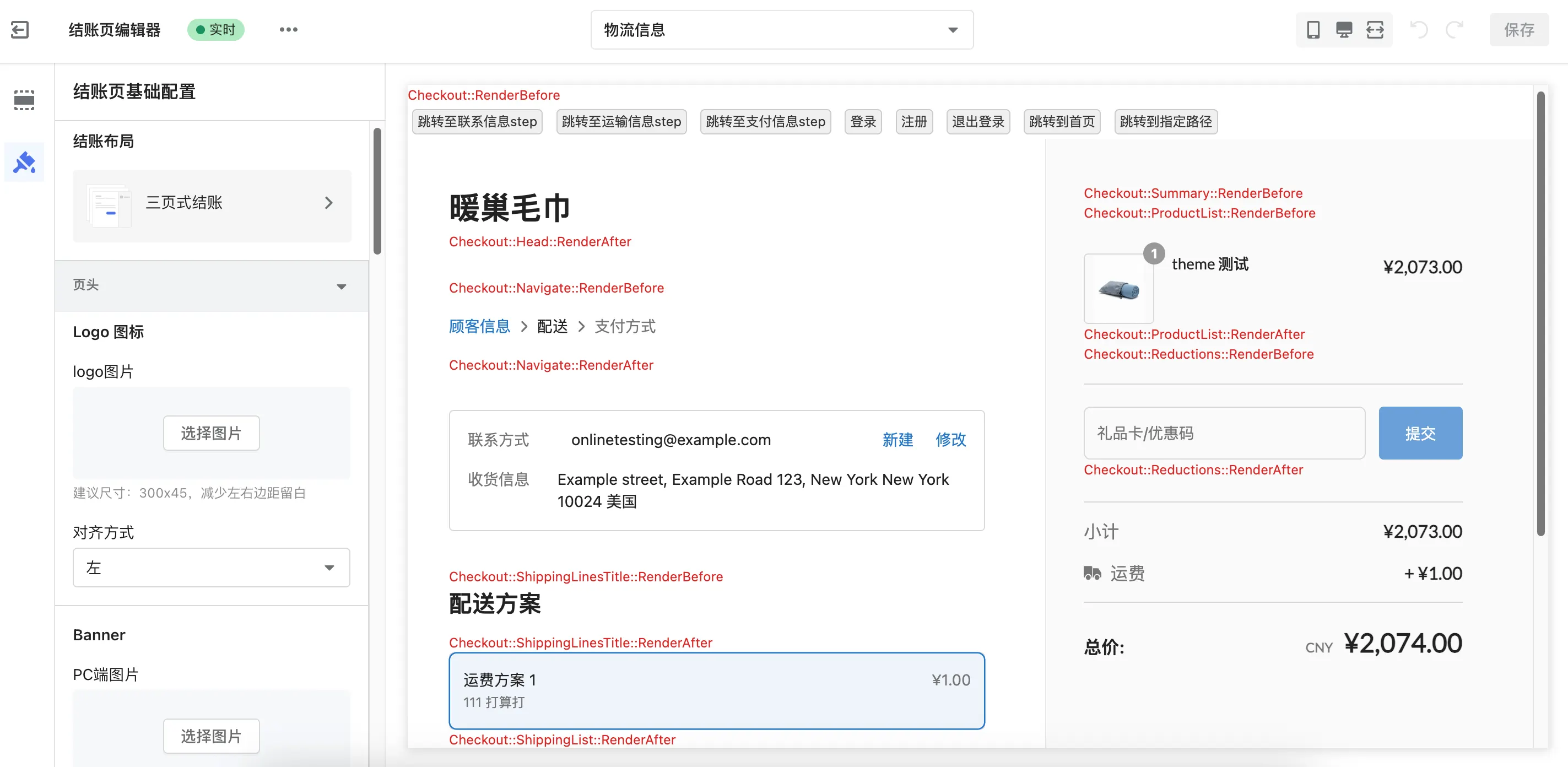
Use case: During development and debugging, quickly confirm the actual position of each extension point on the page.
-
Implementation: Iterate over all extension points and render a red label showing its own name at each location.
src/index.js:
import { extend } from 'shoplazza-extension-ui';

const extensionPoints = [
  'Checkout::RenderBefore',
  'Checkout::RenderAfter',
  'Checkout::Head::RenderAfter',
  'Checkout::FilledInformation::RenderAfter',
  'Checkout::SpecialInstruction::RenderAfter',
  'Checkout::Summary::RenderBefore',
  'Checkout::Navigate::RenderBefore',
  'Checkout::Navigate::RenderAfter',
  'Checkout::ContactInformation::RenderBefore',
  'Checkout::ContactInformation::RenderAfter',
  'Checkout::ShippingLinesTitle::RenderBefore',
  'Checkout::ShippingLinesTitle::RenderAfter',
  'Checkout::ShippingList::RenderAfter',
  'Checkout::ProductList::RenderBefore',
  'Checkout::ProductList::RenderAfter',
  'Checkout::Reductions::RenderBefore',
  'Checkout::Reductions::RenderAfter',
  'Checkout::SectionPayment::RenderBefore',
  'Checkout::SectionPayment::RenderAfter',
  'Checkout::ThankyouHeader::RenderBefore',
  'Checkout::ThankyouContent::RenderBefore',
];

function renderLabel(extensionPoint) {
  return `
    <div style="color:#dc2626;font-size:12px;">
      ${extensionPoint}
    </div>
  `;
}

extensionPoints.forEach(extensionPoint => {
  extend({
    extensionPoint,
    component: renderLabel(extensionPoint),
  });
});
After confirming the positions of each extension point, replace the HTML returned by renderLabel with the actual business content.
Example screenshot:
Scenario 2: Hide native checkout modules
-
Use case: Your extension renders its own contact and shipping blocks, so the native "Contact" and "Shipping address" titles become redundant and should be hidden.
-
Implementation: Declare the targets in an
extension.jsonfile placed next toshoplazza.extension.tomlin the extension directory.
extension.json:
{ "deleteTarget": ["contactInformationHeader", "shippingAddressHeader"] }
Restart shoplazza app dev to apply the change — the dev server does not watch extension.json.
Expected result: the "Contact" and "Shipping address" titles disappear from the checkout page, while the fields below them stay in place.
For the full target list and the CLI requirement, see Hiding native modules.
Scenario 3: API calls and event listening
-
Use case: Gain a comprehensive understanding of the available methods and events in
CheckoutAPI. It serves as a debugging tool and a starting reference when developing new extensions. -
Implementation: Render a set of action buttons at the top of the page to trigger various APIs; simultaneously listen for price, address, and step changes and output them in the console. When the page finishes loading, print the initial values of all APIs.
src/index.html:
<style>
  .checkout-btn {
    margin: 4px;
    padding: 2px 4px;
    border: 1px solid #ccc;
    border-radius: 4px;
    cursor: pointer;
    background-color: #f0f0f0;
    color: #333;
    font-size: 12px;
    line-height: 1.4;
    transition: all 0.3s ease;
  }
  .checkout-btn:hover {
    background-color: #e0e0e0;
  }
</style>
<div data-coe-toolbar>
  <button class="checkout-btn" data-action="stepNavToInformation">Jump to contact info</button>
  <button class="checkout-btn" data-action="stepNavToShipping">Jump to shipping info</button>
  <button class="checkout-btn" data-action="stepNavToPayment">Jump to payment info</button>
  <button class="checkout-btn" data-action="doLogin">Login</button>
  <button class="checkout-btn" data-action="doRegister">Register</button>
  <button class="checkout-btn" data-action="doLogout">Logout</button>
  <button class="checkout-btn" data-action="goToHomePage">Go to homepage</button>
  <button class="checkout-btn" data-action="locationHref">Navigate to URL</button>
</div>
src/index.js:
import { extend } from 'shoplazza-extension-ui';
import template from './index.html';

extend({
  extensionPoint: 'Checkout::RenderBefore',
  component: template,
});

// ⚠️ The log / console.log calls below are for demonstration only. Remove them in production or put them behind a switch.
const LOG = '[checkout-event-api]';
const REGISTRY_KEY = '__CHECKOUT_EVENT_API__';

function log(message, ...args) {
  console.log(`${LOG} ${message}`, ...args);
}

function getRegistry() {
  if (!window[REGISTRY_KEY]) {
    window[REGISTRY_KEY] = { shippingAddress: {} };
  }
  return window[REGISTRY_KEY];
}

function getApi() {
  return window.CheckoutAPI;
}

function makeAction(name, fn) {
  return async () => {
    log(`[action] ${name} → started...`);
    await fn();
    log(`[action] ${name} → done`);
  };
}

const actions = {
  stepNavToInformation: makeAction('Go to the contact information step', () => getApi().step.stepNavToInformation()),
  stepNavToShipping: makeAction('Go to the shipping step', () => getApi().step.stepNavToShipping()),
  stepNavToPayment: makeAction('Go to the payment step', () => getApi().step.stepNavToPayment()),
  doLogin: makeAction('Log in', () => getApi().user.doLogin()),
  doRegister: makeAction('Register', () => getApi().user.doRegister()),
  doLogout: makeAction('Log out', () => getApi().user.doLogout()),
  goToHomePage: makeAction('Go to the home page', () => getApi().step.goToHomePage()),
  locationHref: makeAction('Navigate to a URL', () => getApi().step.locationHref('/')),
};

// Event delegation instead of inline onclick, so nothing leaks into the global namespace
document.addEventListener('click', (event) => {
  const btn = event.target.closest('[data-action]');
  if (!btn || !btn.closest('[data-coe-toolbar]')) return;
  const action = actions[btn.dataset.action];
  if (action) action();
});

const MOUNT_INTERVAL_MS = 100;
const MOUNT_MAX_ATTEMPTS = 50; // 100ms * 50 ≈ 5 seconds

function mount(attempt = 0) {
  const api = getApi();
  if (!api) {
    if (attempt >= MOUNT_MAX_ATTEMPTS) {
      console.warn(`${LOG} CheckoutAPI did not mount within the expected time; giving up.`);
      return;
    }
    // setTimeout instead of requestAnimationFrame, so we do not busy-wait at 60fps on the checkout page
    window.setTimeout(() => mount(attempt + 1), MOUNT_INTERVAL_MS);
    return;
  }

  const reg = getRegistry();

  if (reg.handlePricesChange) api.store.removePricesChangeCb(reg.handlePricesChange);
  if (reg.handleAddressChange) api.address.removeShippingAddressChangeCb(reg.handleAddressChange);
  if (reg.handleStepChange) api.step.removeStepChangeCb(reg.handleStepChange);

  reg.handlePricesChange = (prices) => log('[prices-change]', prices);
  reg.handleAddressChange = (patch) => {
    reg.shippingAddress = { ...reg.shippingAddress, ...patch };
    log('[address-change]', patch);
  };
  reg.handleStepChange = () => log('[step-change]', api.step.getStep());

  api.store.onPricesChange(reg.handlePricesChange);
  api.address.onShippingAddressChange(reg.handleAddressChange);
  api.step.onStepChange(reg.handleStepChange);

  console.group(`${LOG} initialized`);
  log('step:', api.step.getStep());
  log('orderInfo:', api.store.getOrderInfo());
  log('orderStatus:', api.store.getOrderStatus());
  log('referInfo:', api.store.getReferInfo());
  log('prices:', api.store.getPrices());
  log('products:', api.summary.getProductList());
  log('user.isLogin:', api.user.isLogin());
  log('user.info:', api.user.getUserInfo());
  log('shippingAddress:', api.address.getShippingAddress());
  console.groupEnd();
}

mount();
Key Points:
-
Event delegation instead of inline onclick: All buttons use
data-action="xxx", and a singleclickevent listener ondocumentlocates the target viaclosest('[data-action]'). -
makeAction: Wraps async operations uniformly, logging before and after execution. -
mount: UsessetTimeoutwith a maximum retry count (~5 seconds) to wait forCheckoutAPIto mount, avoiding the 60fps busy-wait caused byrequestAnimationFrame. -
Before registering event listeners, calls the corresponding
remove*method to clear old callbacks and prevent duplicate registration during hot reload. -
getRegistry: Stores callback function references on thewindowglobal object to ensure the same function reference is passed whenremove*is called.
Scenario 4: Auto-fill address into credit card name
-
Applicable scenario: After the buyer fills in the shipping address during the contact information step, when they proceed to the payment step, automatically fill the name into the credit card holder name input to reduce duplicate entry.
-
Checkout layout explanation: Shoplazza supports three checkout layouts, which can be switched in the store admin panel under "Checkout Page Editor → Basic Checkout Configuration → Checkout Layout". This extension listens to both
onShippingAddressChangeandonStepChangeevents simultaneously, and triggers auto-fill at mount time based on the current step, covering different fill timings across all three layouts without requiring individual adaptation.
Core logic:
-
Listen for shipping address changes, merging each changed field into the local cache.
-
Listen for step changes, triggering fill when the step switches to
payment_method. -
At mount time, if the current step is already
payment_methodorcontact_information, attempt fill directly (covers scenarios where the page reloads into these steps). -
When filling, query the DOM for the credit card name input. If the input is not yet rendered, retry every 100ms for up to 5 seconds.
DOM selector warning: #card_first_name / #card_last_name are internal DOM elements of the current version of Shoplazza's checkout page, which may change as the platform upgrades. For production extensions: (1) try to fulfill requirements via public APIs like CheckoutAPI; (2) when DOM manipulation is unavoidable, add version detection and graceful degradation, and perform periodic regression testing.
src/index.js:
// ⚠️ The log / console.log calls below are for demonstration only. Remove them in production, or replace them with a log switch you can turn off.
const LOG = '[checkout-name-autofill]';
const REGISTRY_KEY = '__CHECKOUT_NAME_AUTOFILL__';

function log(message, ...args) {
  console.log(`${LOG} ${message}`, ...args);
}

function getRegistry() {
  if (!window[REGISTRY_KEY]) {
    window[REGISTRY_KEY] = { shippingAddress: {} };
  }
  return window[REGISTRY_KEY];
}

function getApi() {
  return window.CheckoutAPI;
}

function trimText(value) {
  return typeof value === 'string' ? value.trim() : '';
}

function setInputValue(input, value) {
  if (!input) return;
  input.value = value;
  input.dispatchEvent(new Event('input', { bubbles: true }));
  input.dispatchEvent(new Event('change', { bubbles: true }));
}

function tryFillCardholderName(address, remaining = 50) {
  const firstName = trimText(address?.firstName);
  const lastName = trimText(address?.lastName);

  if (!firstName && !lastName) return;

  const firstNameInput =
    document.querySelector('#card_first_name') ||
    document.querySelector('input[name="card_first_name"]');
  const lastNameInput =
    document.querySelector('#card_last_name') ||
    document.querySelector('input[name="card_last_name"]');

  if (!firstNameInput || !lastNameInput) {
    if (remaining <= 0) return;
    window.setTimeout(() => tryFillCardholderName(address, remaining - 1), 100);
    return;
  }

  if (firstName) setInputValue(firstNameInput, firstName);
  if (lastName) setInputValue(lastNameInput, lastName);

  log('[cardholder-autofill] Fill complete', { firstName, lastName });
}

function handleAddressChange(patch) {
  const reg = getRegistry();
  reg.shippingAddress = { ...reg.shippingAddress, ...patch };
  log('[address-change]', patch);
  tryFillCardholderName(reg.shippingAddress);
}

function handleStepChange() {
  if (getApi().step.getStep() === 'payment_method') {
    tryFillCardholderName(getRegistry().shippingAddress);
  }
}

const MOUNT_INTERVAL_MS = 100;
const MOUNT_MAX_ATTEMPTS = 50; // 100ms * 50 ≈ 5 seconds

function mount(attempt = 0) {
  const api = getApi();
  if (!api) {
    if (attempt >= MOUNT_MAX_ATTEMPTS) {
      console.warn(`${LOG} CheckoutAPI did not mount within the expected time; giving up.`);
      return;
    }
    // Use setTimeout instead of requestAnimationFrame to avoid a 60fps busy wait that burns checkout page CPU
    window.setTimeout(() => mount(attempt + 1), MOUNT_INTERVAL_MS);
    return;
  }

  const reg = getRegistry();

  if (reg.handleAddressChange) api.address.removeShippingAddressChangeCb(reg.handleAddressChange);
  if (reg.handleStepChange) api.step.removeStepChangeCb(reg.handleStepChange);

  reg.handleAddressChange = handleAddressChange;
  reg.handleStepChange = handleStepChange;

  reg.shippingAddress = api.address.getShippingAddress();

  api.address.onShippingAddressChange(handleAddressChange);
  api.step.onStepChange(handleStepChange);

  // Already on the payment or contact information step: attempt one fill right away (covers reloading into or landing directly on these steps)
  const currentStep = api.step.getStep();
  if (currentStep === 'payment_method' || currentStep === 'contact_information') {
    tryFillCardholderName(reg.shippingAddress);
  }
}

mount();
Key Points:
-
tryFillCardholderName: Finds the credit card name input fields. If the fields are not rendered yet, retries every 100ms up to 50 times (approximately 5 seconds). Supports both ID selectors andnameattribute selectors for different DOM structures. -
setInputValue: After filling the input value, manually dispatchesinputandchangeevents to ensure the page framework detects the value update. -
handleAddressChange: Every time the address changes, merges the latest patch and immediately attempts to fill (covers single-step checkout layout scenarios). -
handleStepChange: Triggers filling when the step switches to the payment page (covers multi-step checkout layout scenarios). -
Initial fill in
mount: Handles filling when the page loads directly on a specific step (covers scenarios where the user enters the payment page directly). -
This extension does not need to render any UI, does not call
extend, and only runs logic in the background.
Scenario 5: Free-shipping progress bar based on cart amount
-
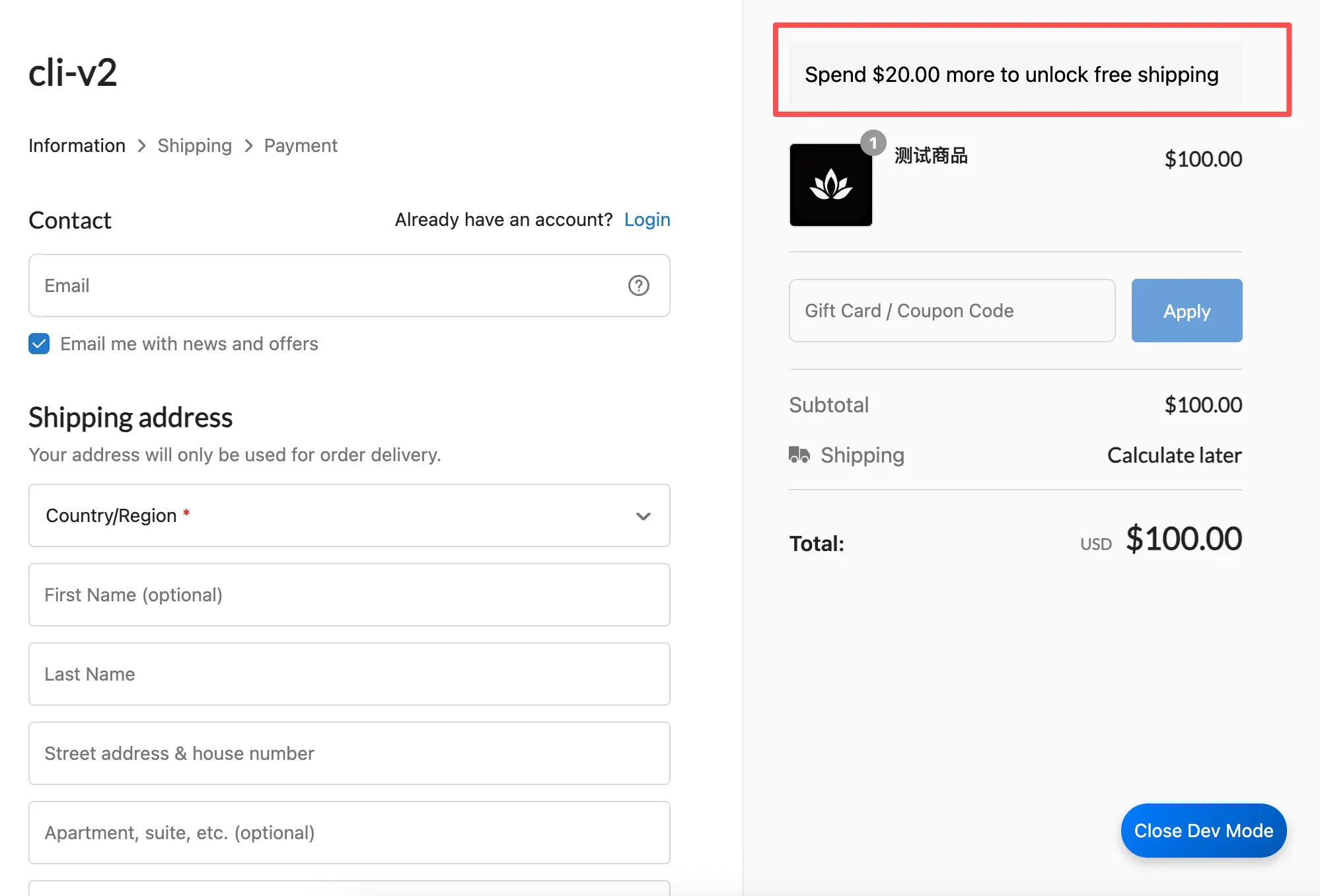
Use case: Encourage customers to add more to their cart. When the subtotal is below a threshold, show how much more they need to spend to unlock free shipping; once reached, show a success message. The bar updates live as the cart changes.
-
Implementation: Read the subtotal via
CheckoutAPI.store.getPrices(), render a banner at a checkout extension point, and re-render onCheckoutAPI.store.onPricesChange().
This recipe focuses on the business logic. For the CheckoutAPI mount-waiting pattern (mount) and a full API tour, see Scenario 3.
This recipe only displays a banner — it does not waive shipping. The actual free-shipping rule must be configured by the merchant in the store admin. Keep FREE_SHIPPING_THRESHOLD in sync with that rule, otherwise the banner may promise free shipping that checkout still charges for.
src/index.js:
import { extend } from 'shoplazza-extension-ui';

// Free-shipping threshold, in the store's currency. Change it to match
// your campaign (e.g. read it from the extension settings instead of
// hard-coding).
const FREE_SHIPPING_THRESHOLD = 120;

// `CheckoutAPI` is attached to `window` only after the checkout page has
// fully loaded. Reading `window.CheckoutAPI` too early returns `undefined`,
// so poll for it instead of accessing it directly.
function mount(cb) {
  let tries = 0;
  const timer = setInterval(() => {
    if (window.CheckoutAPI) {
      // It's ready: stop polling and hand the API to the caller.
      clearInterval(timer);
      cb(window.CheckoutAPI);
    } else if (++tries > 50) {
      // Give up after ~5s (50 retries × 100ms) so we never loop forever.
      clearInterval(timer);
      console.warn('CheckoutAPI not mounted in time');
    }
  }, 100);
}

// Build the banner's HTML string from the current subtotal.
function render(subtotal) {
  const remaining = FREE_SHIPPING_THRESHOLD - subtotal;
  // Below the threshold: tell the customer how much more to spend.
  // At or above it: confirm free shipping is unlocked.
  const text =
    remaining > 0
      ? `Spend $${remaining.toFixed(2)} more to unlock free shipping`
      : 'You have unlocked free shipping!';
  return `<div style="padding:12px;background:#f5f5f5;">${text}</div>`;
}

mount((api) => {
  // Render (or re-render) the banner at a fixed checkout extension point.
  // `subtotalPrice` is a string, so `parseFloat` it before doing math.
  const draw = (prices) =>
    extend({
      extensionPoint: 'Checkout::Summary::RenderBefore',
      component: render(parseFloat(prices.subtotalPrice)),
    });

  // Draw once with the initial prices...
  draw(api.store.getPrices());
  // ...then redraw automatically whenever the cart total changes.
  api.store.onPricesChange((prices) => draw(prices));
});