Iframe: Pop-up payment
The iframe model embeds a third-party payment window within the Shoplazza checkout page.
Sequence diagram steps
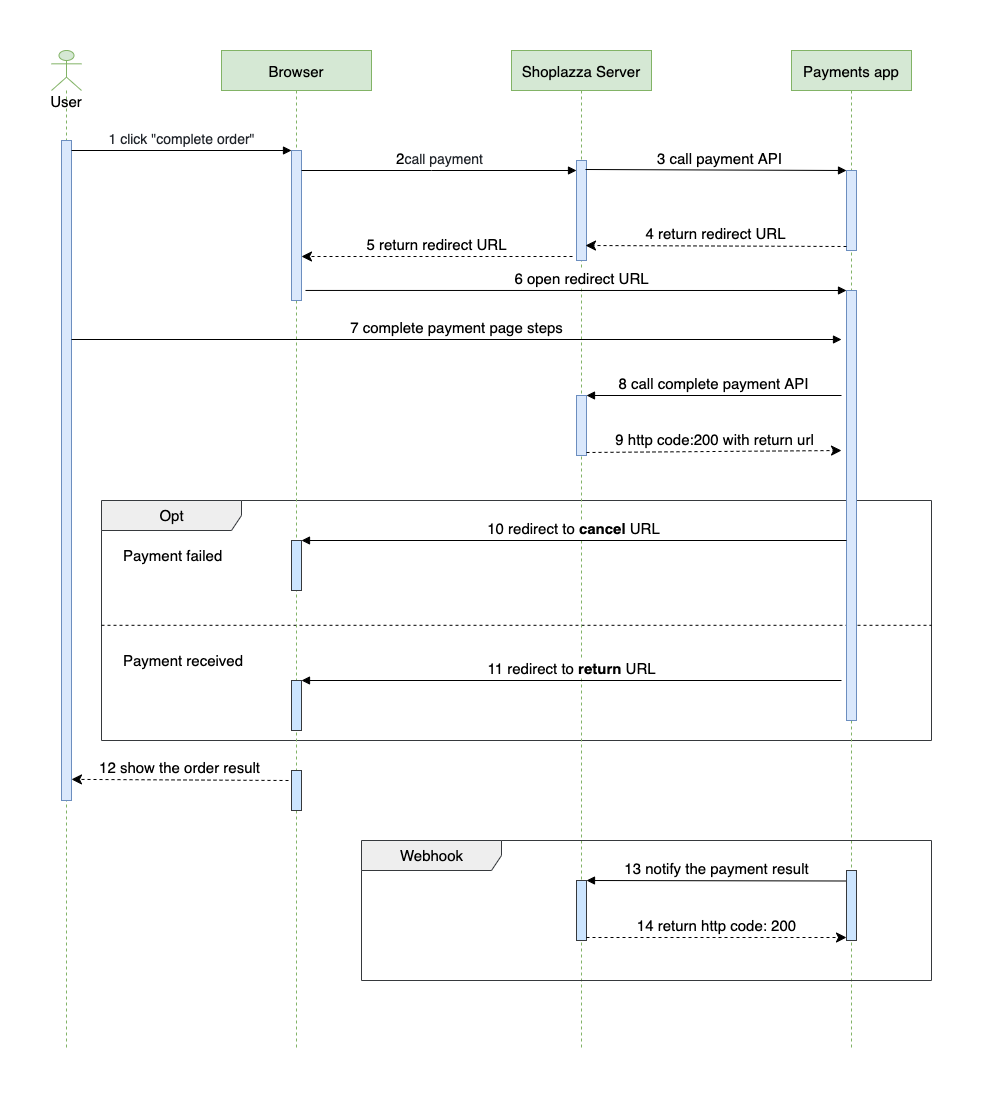
- The customer selects a payment method and clicks to complete payment.
- The browser sends the payment request to the Shoplazza server.
- The Shoplazza server forwards the payment request to the payments app server.
- The payments app server returns a redirect URL to the Shoplazza server.
- The Shoplazza server sends the redirect URL back to the browser.
- The browser opens the third-party payment page in an iframe or pop-up container.
- The customer submits payment details in the payment window.
- The payments app server calls the Complete Payment API.
- Shoplazza returns a redirect URL to the payments app server.
- If payment fails, the customer is redirected to the
cancel_urlprovided in the payment request. - If payment succeeds, the customer is redirected to the
complete_urlreturned by Shoplazza. - The customer is directed to the order payment result page.
- The payments app server sends the final payment result notification to the callback URL.
- Shoplazza acknowledges receipt of the notification with HTTP
200.
Payment request
The iframe payment request uses the same payment session request structure as the sale model. The payments app returns a redirect_url that Shoplazza loads inside the iframe or pop-up payment container.
{
  "redirect_url": "https://payment-gateway.example/iframe"
}
Iframe dimensions
The payments app can customize iframe dimensions:
- Width and height are specified in pixels, without units.
- Minimum width is
300px. - Minimum height is
200px. - Maximum width and height must not exceed screen dimensions.
- Values exceeding screen size default to
80vw x 80vh.
Failure response
For failures, return an error code and message.
{
  "code": "ERR-1234",
  "message": "Invalid amount"
}