Card: Credit card direct payment
The card model lets customers enter credit card details directly on the Shoplazza checkout page. This model requires PCI-DSS compliance and must support 3DS verification where required.
Sequence diagram steps
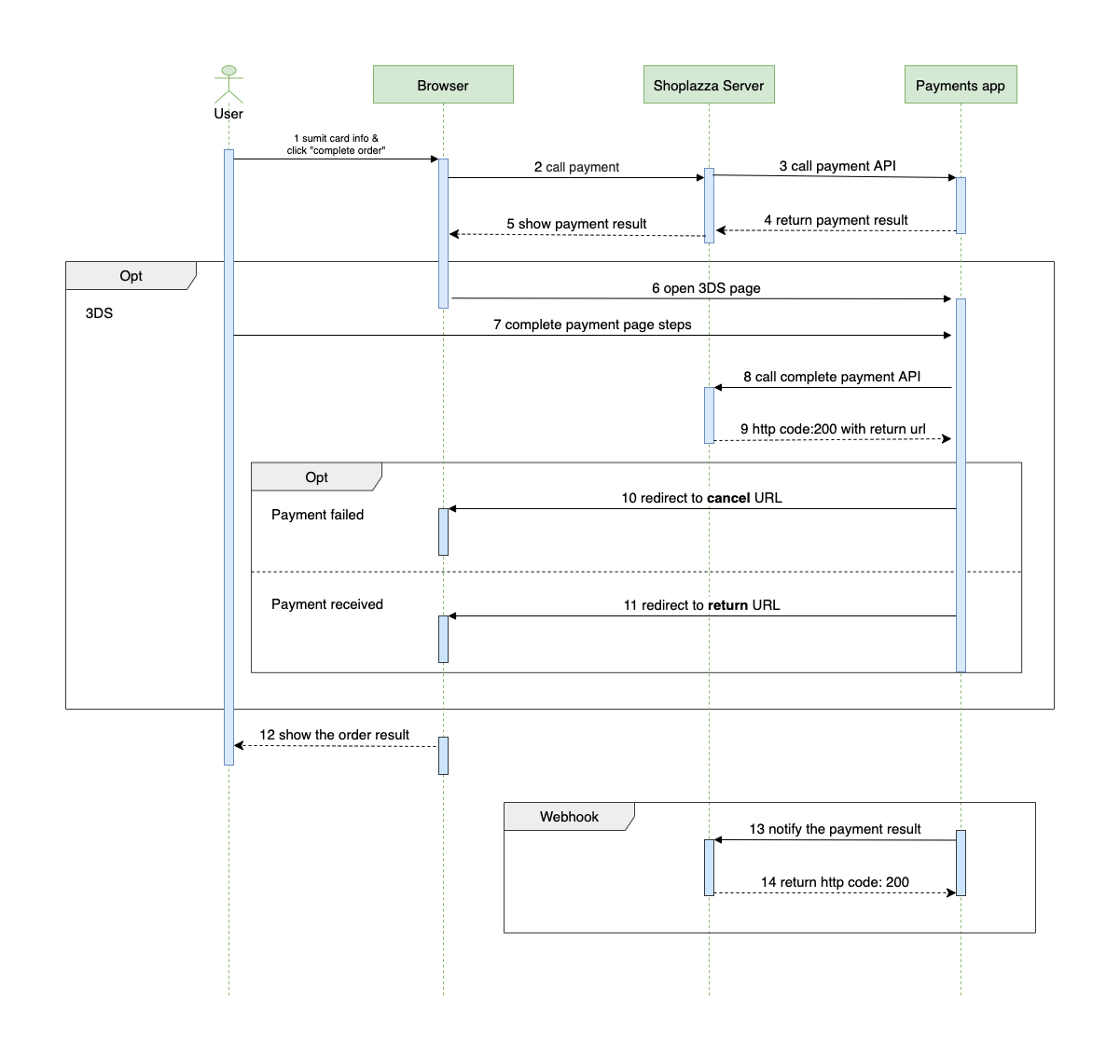
- The customer enters credit card information and clicks to complete payment.
- The browser sends the payment request to the Shoplazza server.
- The Shoplazza server forwards the payment request to the payments app server.
- The payments app server returns the payment status to the Shoplazza server.
- The Shoplazza server sends the payment result back to the browser.
- If 3DS verification is required, the browser redirects the customer to the 3DS verification page. Otherwise, the flow continues to the result page.
- The customer submits verification details on the 3DS page.
- The payments app server calls the Complete Payment API.
- Shoplazza returns a redirect URL to the payments app server.
- If payment fails, the customer is redirected to the
cancel_urlprovided in the payment request. - If payment succeeds, the customer is redirected to the
complete_urlreturned by Shoplazza. - The customer is directed to the order payment result page.
- The payments app server sends the final payment result notification to the callback URL.
- Shoplazza acknowledges receipt of the notification with HTTP
200.
Card request fields
Direct card payment uses the payment session request and includes serialized credit card information in the cards field.
| Key | Required | Type | Description |
|---|---|---|---|
cards | No | string | Serialized JSON object containing credit card information. |
cards.first_name | No | string | First name on the card. |
cards.last_name | No | string | Last name on the card. |
cards.card_number | No | string | Credit card number. |
cards.expire_year | No | string | Two-digit expiration year. |
cards.expire_month | No | string | Two-digit expiration month. |
cards.card_cvv | No | string | CVV, 3 or 4 digits. |
Response without 3DS
If 3DS is not required, return the payment result directly.
{
  "app_id": "12345",
  "payment_id": "7eb3fefb-6b43-4400-b40a-a2a0531364ae",
  "amount": "254.20",
  "currency": "CAD",
  "status": "paid",
  "transaction_no": "123456789",
  "type": "sale",
  "message": "",
  "test": false,
  "timestamp": "2021-09-01T18:32:20Z"
}
Response with 3DS
If 3DS verification is required, return a redirect URL for verification.
{
  "redirect_url": "https://3ds-verification.example"
}
Failure response
{
  "code": "ERR-1234",
  "message": "amount less than 1000"
}