Modify order line items at checkout
Background
Add-on services such as shipping protection can currently only be shown and selected on the cart page. That limit leaves three problems unsolved:
- Buyers who click "Buy now" and go straight to checkout never see the add-on service, so the exposure is lost;
- Buyers who did not select it on the cart page get no second chance to add it at checkout;
- Buyers who selected it and want to cancel have to interrupt checkout and go back to the cart, which often leads to an abandoned order.
All three problems come from the same root cause: the add-on service is tied to the cart page and cannot reach the checkout page. So the goal here is to move the display and the toggle to the checkout page, so buyers can add or cancel the service at any moment before payment. That removes the missing exposure, the single add-on chance, and the high cost of cancelling.
How it works
-
Initialization: The buyer opens the checkout page. The checkout extension injects the toggle UI into an extension point and polls until both
CheckoutAPIis mounted and the toggle DOM is ready. Both happen asynchronously after the page loads. -
First fee calculation: Read the order line items with
getProductList(), exclude the add-on service line itself, and calculate the fee. The fee is shown next to the toggle. -
The buyer flips the toggle: On every change, the platform recalculates the whole order. Once the latest data comes back, refresh the toggle state and the fee.
- Toggle on: call
addLineItemsto add the selected price tier as its own line item. Pass two platform-defined markers inproperties—_shoplazza_exclude_calculation: true(the line is excluded from discount, shipping, tax, and surcharge calculation) and_shoplazza_bundled_product: true(a bundled product that cannot be ordered on its own); - Toggle off: call
removeLineItemsto remove that line.
- Toggle on: call
-
Fee updates: Any later price change — applying or removing a discount code or gift card, and the buyer's own toggle actions — fires
onPricesChange. In the callback, the checkout extension recalculates the fee and compares it with the tier actually on the order. If they differ, it removes the old line and adds the line again with the correct tier.
The overall flow:
Example walkthrough
The rest of this page walks you through a complete feature: an add-on service toggle on the checkout page, using shipping protection as the example. When the buyer turns the toggle on, the protection fee is added to the current order as a line item and follows the order total. When the buyer turns it off, that line item is removed.
Prerequisites
- A checkout extension project — see Create a checkout extension.
- The add-on service product already exists in the merchant's store. Your app creates it through the product creation API when the merchant installs the app: one product, several variants as price tiers, marked as not requiring shipping and not tracking inventory.
- Your backend records the tier
variantIdfor each store when it creates the product, and the extension fetches them from your backend at startup. - Buyers must not be able to buy that product directly from the storefront. A line created that way carries no markers, so it takes part in discounts, tax, and fulfillment like a normal product.
Step 1: Render the toggle
Use extend() to attach the toggle to an extension point. For an order-summary add-on service, use the Checkout::Reductions::RenderAfter extension point, which sits below the discount code input. All the code on this page lives in a single src/index.js file, and the UI is a template string:
import { extend } from 'shoplazza-extension-ui';

// The toggle widget: hidden by default, shown once CheckoutAPI is ready and the fee is calculated
const template = `
<div id="protection-widget" style="display:none;padding:12px;border:1px solid #e5e7eb;border-radius:6px;">
  <label>
    <input type="checkbox" id="protection-toggle" />
    Shipping protection <span id="protection-fee"></span>
  </label>
</div>
`;

// Inject the toggle HTML into the extension point below the discount code input
extend({
  extensionPoint: 'Checkout::Reductions::RenderAfter',
  component: template,
});
Step 2: Wait for CheckoutAPI and the widget
The extension script starts running early in the page load, when two things may not exist yet: window.CheckoutAPI, which the platform mounts only after the page has fully loaded (see loading timing), and your own toggle DOM, because extend() injects into the extension point asynchronously. Poll until both are ready, then run the business logic:
// Poll until both are ready: CheckoutAPI is mounted and the toggle DOM is injected
// (both finish asynchronously after page load, in no fixed order) — every 200ms, up to 50 times (about 10 seconds)
function mount(onReady, retries = 50) {
  if (window.CheckoutAPI && document.getElementById('protection-widget')) {
    return onReady(window.CheckoutAPI);
  }
  if (retries <= 0) return;
  setTimeout(() => mount(onReady, retries - 1), 200);
}
Step 3: Calculate the fee
Read the current order line items with CheckoutAPI.summary.getProductList(), exclude the protection line you added yourself, calculate the fee from the total of the remaining products, and pick the variant whose price is closest to it.
// Rate: fee = product total × RATE. The rule is up to your business.
const RATE = 0.02;

// Price tiers: the variants created with the product and their prices.
// The variantId differs per store, so a real implementation fetches them from
// your backend. They are inlined here for the sake of the example.
const TIERS = [
  { variantId: 'tier-variant-id-050', price: 0.5 },
  { variantId: 'tier-variant-id-100', price: 1.0 },
  { variantId: 'tier-variant-id-200', price: 2.0 },
  { variantId: 'tier-variant-id-290', price: 2.9 },
];
const TIER_IDS = new Set(TIERS.map(t => t.variantId));

// Mutation source: a required parameter of addLineItems / removeLineItems that says who made the change
const SOURCE = 'shipping_protection';

// Tell whether a line item is the protection line you added: check whether its variantId belongs to the tier set
const isProtectionLine = item => TIER_IDS.has(item.variantId);

function expectedTier(api) {
  // Take all order line items and exclude the protection line itself to get the covered products
  const goods = api.summary.getProductList().filter(p => !isProtectionLine(p));
  // Price fields are strings such as "68.00", so convert them before summing.
  // finalLinePrice is the discounted price and linePrice is the price before discount —
  // which one the rate applies to is a business decision; this example uses the discounted price.
  const total = goods.reduce((sum, p) => sum + Number(p.finalLinePrice || p.linePrice), 0);
  const fee = total * RATE;
  // Pick the tier whose price is closest to the fee
  return TIERS.reduce((best, t) =>
    Math.abs(t.price - fee) < Math.abs(best.price - fee) ? t : best
  );
}
Step 4: Add the line item when the toggle is on
Call CheckoutAPI.order.addLineItems to add the selected tier to the order. The parameters:
mutationSource: required, a source identifier string;lineItems[].variantId: the variant id to add. The line price comes from its price;lineItems[].quantity: the quantity;lineItems[].properties: pass an object directly, do notJSON.stringifyit yourself. The two markers are explained in the "How it works" section.
async function addProtection(api) {
  // Pick the target tier from the current product total
  const tier = expectedTier(api);
  const res = await api.order.addLineItems({
    mutationSource: SOURCE,
    lineItems: [
      {
        variantId: tier.variantId,
        quantity: 1,
        properties: {
          _shoplazza_bundled_product: true,      // cannot be ordered on its own
          _shoplazza_exclude_calculation: true,  // excluded from discount, tax, and shipping calculation
        },
      },
    ],
  });
  return res;
}
The method returns a Promise and never throws. Check the result with res.state === 'success'. On success the platform has already recalculated the whole order, and the return value carries the latest line items:
{
  "state": "success",
  "message": "success",
  "errors": [],
  "data": {
    "orderId": "2446407205415840740905",
    "lineItems": [
      {
        "id": "18b3f672-8c94-42fc-80c6-8b68ba2b4ebf",
        "variantId": "tier-variant-id-290",
        "productTitle": "Shipping protection",
        "price": "2.90",
        "linePrice": "2.90",
        "trunkPrice": "0.00",
        "quantity": 1,
        "requiresShipping": false,
        "properties": "{\"_shoplazza_bundled_product\":true,\"_shoplazza_exclude_calculation\":true}"
      }
    ]
  }
}
properties goes in as an object and comes back as a JSON string, so JSON.parse it before reading. The line item id changes every time the line is removed and added again, so never cache it — always use the latest value from data.lineItems.
Step 5: Remove the line item when the toggle is off
Call CheckoutAPI.order.removeLineItems and pass the id of the line item to remove — the line id, not the variantId — together with the source identifier.
async function removeProtection(api) {
  // Find the protection line you added among the current line items and take its line id
  const line = api.summary.getProductList().find(isProtectionLine);
  if (!line) return null;
  return api.order.removeLineItems({
    mutationSource: SOURCE,
    lineItemIds: [line.id],
  });
}
When the removal fails, the error code is in state and errors, and data is null:
{
  "state": "bundled_product_requires_real_item",
  "message": "bundled_product_requires_real_item",
  "errors": ["bundled_product_requires_real_item"],
  "data": null
}
bundled_product_requires_real_item means this removal would leave the order with nothing but the add-on service line item, the bundled line. This is how the platform makes sure the add-on service is never bought on its own.
Step 6: Reconcile on price changes
The add-on service fee must follow the product total. Reconcile at two moments:
- Once after the checkout page finishes loading
- In the
CheckoutAPI.store.onPricesChangecallback when the total changes — the platform fires it after every recalculation, which covers applying and removing discount codes and gift cards, recalculations caused by address changes, and your own add and remove calls
The reconciliation logic: pick the expected tier again from the latest product total and compare it with the tier actually on the protection line, by variantId. If they differ, remove the old line and add the expected tier instead.
// busy: a mutex flag for a mutation in progress, so no second one is started
let busy = false;
// retries: how many corrections one reconciliation round has made, so a fee that never
// matches does not retry forever
let retries = 0;

// Refresh the toggle UI. line === null means the order has no protection line, so the toggle is off.
function syncUi(api, line) {
  document.getElementById('protection-widget').style.display = 'block';
  document.getElementById('protection-toggle').checked = Boolean(line);
  document.getElementById('protection-fee').textContent =
    line ? line.linePrice : expectedTier(api).price.toFixed(2);
}

function hideWidget() {
  document.getElementById('protection-widget').style.display = 'none';
}

async function reconcile(api) {
  if (busy) return;
  // No protection line on the order: the buyer has not turned it on, so only refresh the fee
  const line = api.summary.getProductList().find(isProtectionLine);
  if (!line) return syncUi(api, null);

  const tier = expectedTier(api);
  // The tier on the order is the expected tier: reconciliation passes, so reset the retry counter.
  // (Compare variantId rather than price, so multi-currency amounts do not fail to match.)
  if (line.variantId === tier.variantId) {
    retries = 0;
    return syncUi(api, line);
  }
  // Still mismatched after two corrections: remove the protection line and hide the widget,
  // so the buyer never pays a wrong fee. Better to sell no protection on this order.
  if (retries >= 2) {
    await api.order.removeLineItems({ mutationSource: SOURCE, lineItemIds: [line.id] });
    return hideWidget();
  }
  // Correct it: remove the old line → add the tier for the new fee → reconcile once more to refresh the UI.
  // (busy swallows the price events during the tier switch, so reconcile again by hand,
  // otherwise the toggle state is never updated.)
  retries += 1;
  busy = true;
  await api.order.removeLineItems({ mutationSource: SOURCE, lineItemIds: [line.id] });
  await addProtection(api);
  busy = false;
  return reconcile(api);
}

// Entry point: once CheckoutAPI is ready, bind the toggle event, reconcile for the first time, and listen for price changes
mount(api => {
  document.getElementById('protection-toggle').addEventListener('change', async e => {
    if (busy) return;
    busy = true;
    e.target.disabled = true;  // disable the toggle while the request runs, so it cannot be clicked repeatedly
    const res = e.target.checked ? await addProtection(api) : await removeProtection(api);
    e.target.disabled = false;
    busy = false;
    // On failure, flip the toggle back
    if (res && res.state !== 'success') e.target.checked = !e.target.checked;
    reconcile(api);
  });
  reconcile(api);
  // Fired by the platform after every recalculation, as the single entry point for reconciliation.
  // The discounted price from getProductList may not be updated the moment the event fires,
  // so check again after 600ms.
  api.store.onPricesChange(() => {
    reconcile(api);
    setTimeout(() => reconcile(api), 600);
  });
});
Reconciliation cannot loop forever: your own correction fires onPricesChange again, but by then the expected tier and the tier on the order already match, so the function returns right away.
- The moment
onPricesChangefires, the discounted price (finalLinePrice) returned bygetProductList()may not be updated yet. Reconciling only immediately misses tier switches, which is why the code adds one delayed check; - A tier switch is two sequential mutations, removing the old line and adding the new one. Each triggers a full recalculation, and the whole switch takes about 2 to 4 seconds. Add a loading state to the toggle during the switch so the buyer knows it is being processed.
Campaigns such as flash sales change the variant price of the add-on service directly, before the checkout calculation runs, and _shoplazza_exclude_calculation cannot isolate that — a discounted add-on service line keeps the discounted price. Tell merchants not to include the add-on service product in any campaign that changes its price.
Verification
Run shoplazza app dev in the extension project. Once the extension is pushed to the linked store, add a product on the storefront and go to the checkout page:
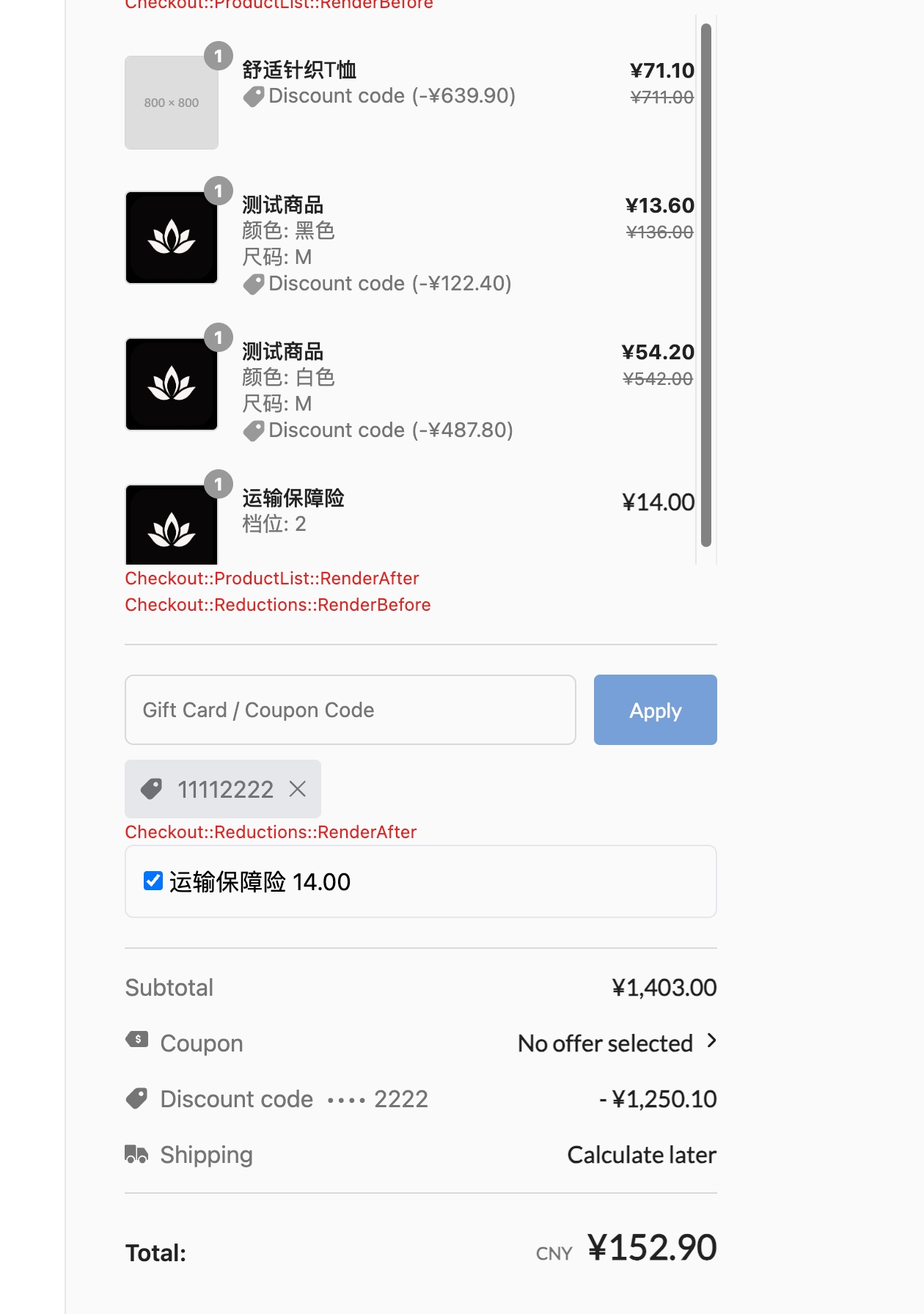
- The toggle appears below the discount code input, with the fee calculated from the current product total next to it;
- Turn the toggle on — the order summary gains an add-on service line item and the total goes up by that amount. The line carries no discount tag;
- Turn the toggle off — the line disappears and the total is restored;
- Apply a discount code — the normal product lines get a discount while the add-on service line price stays the same, which shows the isolation works. If your rate is based on the discounted price, the fee next to the toggle updates as well;
- Open the browser console and confirm there are no errors.
After you change the extension source, restart shoplazza app dev to push it again.
The result looks like this:
Next steps
- Extension points — every slot you can render content into
- CheckoutAPI reference — the full
CheckoutAPIcapabilities - Checkout extension recipes — more scenarios, including API calls and event listening