OAuth Authentication
Before a public app can call the Shoplazza Open API, it must first obtain an Access Token granted by the store. Shoplazza uses the OAuth 2.0 Authorization Code flow to issue tokens.
Page purpose: Reference layer — clearly explain the parameters, flow, and token lifecycle involved in OAuth.
If you want to follow step-by-step to get your app running from scratch: go to the Build an App with Node.js and Express tutorial.
Flow Overview
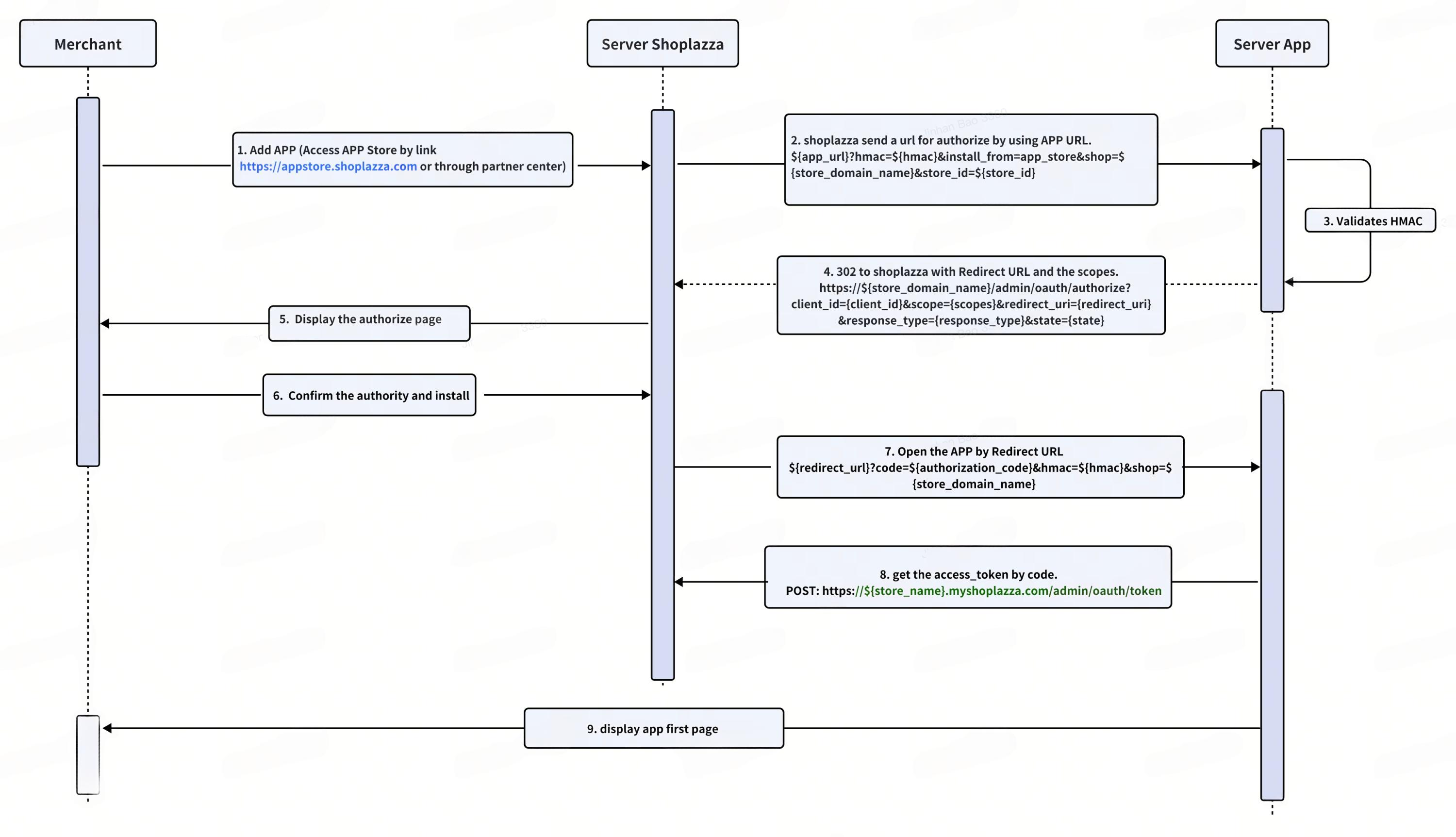
Merchant clicks Add App
        │
        ▼
① Shoplazza backend calls your configured App URL (with hmac + shop + store_id)
        │
        ▼
② Your app validates hmac → generates state → redirects to Shoplazza authorization page
        │
        ▼
③ Merchant agrees to your scope request on the Shoplazza authorization page
        │
        ▼
④ Shoplazza calls back your redirect_uri (with code + state + hmac)
        │
        ▼
⑤ Your app validates state, hmac → exchanges code for access_token
        │
        ▼
⑥ Persist (shop, access_token, refresh_token, expires_at)
        │
        ▼
   Call Open API, Header: `Access-Token: <access_token>`
The following diagram shows the complete OAuth authorization interaction flow:
Key Parameters
| Parameter | Source | Description |
|---|---|---|
client_id | Partner Center | App unique identifier, public |
client_secret | Partner Center | App secret, never expose it to the frontend |
redirect_uri | Your configured callback URL | Must match the one configured in the Partner Center exactly |
scope | The permissions you declare | Comma or space-separated list of scopes |
state | Random string you generate | Anti-CSRF, returned unchanged in the callback, must be validated |
hmac | Shoplazza returns it in the query | Anti-request-forgery, must be validated, see HMAC Signature Verification for algorithm |
code | Returned in Shoplazza callback | Authorization Code, can only be used once |
access_token | Returned by the token endpoint | Credential for API calls, sent in the Access-Token header |
refresh_token | Returned by the token endpoint | Used to refresh the access_token |
expires_at | Returned by the token endpoint | Access token expiry timestamp (seconds) |
Key Steps
② Validate Parameters and Redirect to Authorization
After the merchant clicks Add App from the Shoplazza App Store, Shoplazza calls the App URL you configured in the Partner Center. The URL looks like:
https://your-app.example.com/auth/install?hmac=<hmac>&install_from=app_store&shop=<store_name>.myshoplaza.com&store_id=<store_id>
Your app must:
- Validate
hmac(see HMAC Signature Verification) - Validate that
shopends with.myshoplaza.com - Generate a random
stateand persist it (to compare in the callback) - Redirect the merchant to the Shoplazza authorization page:
https://<shop>/admin/oauth/authorize
  ?client_id=<client_id>
  &scope=<scopes>
  &redirect_uri=<redirect_uri>
  &response_type=code
  &state=<state>
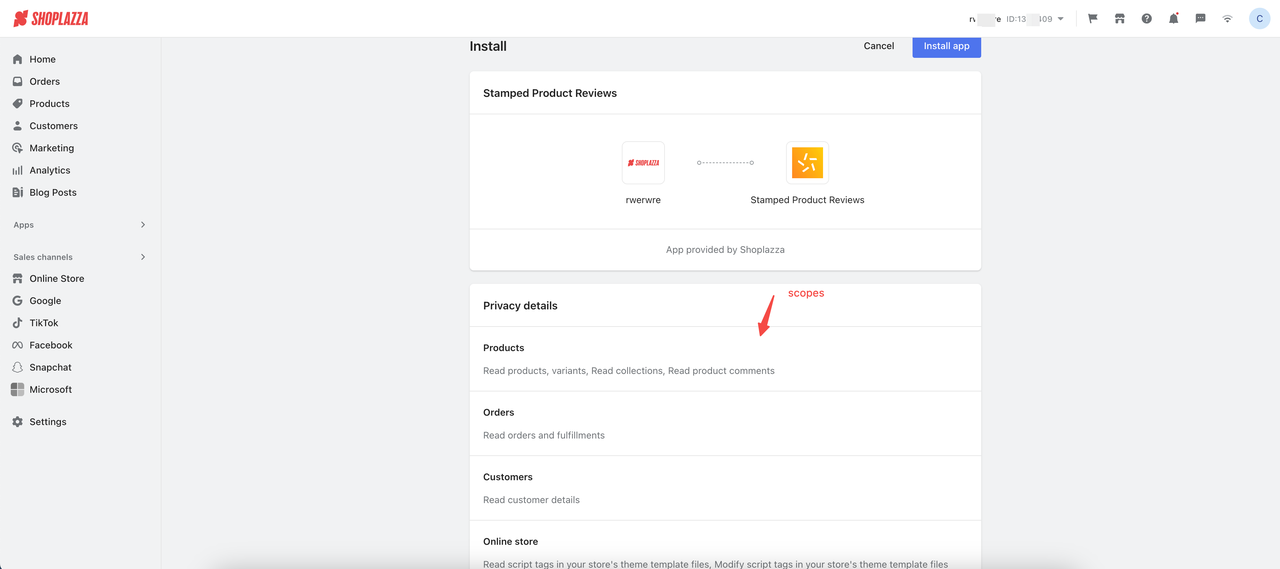
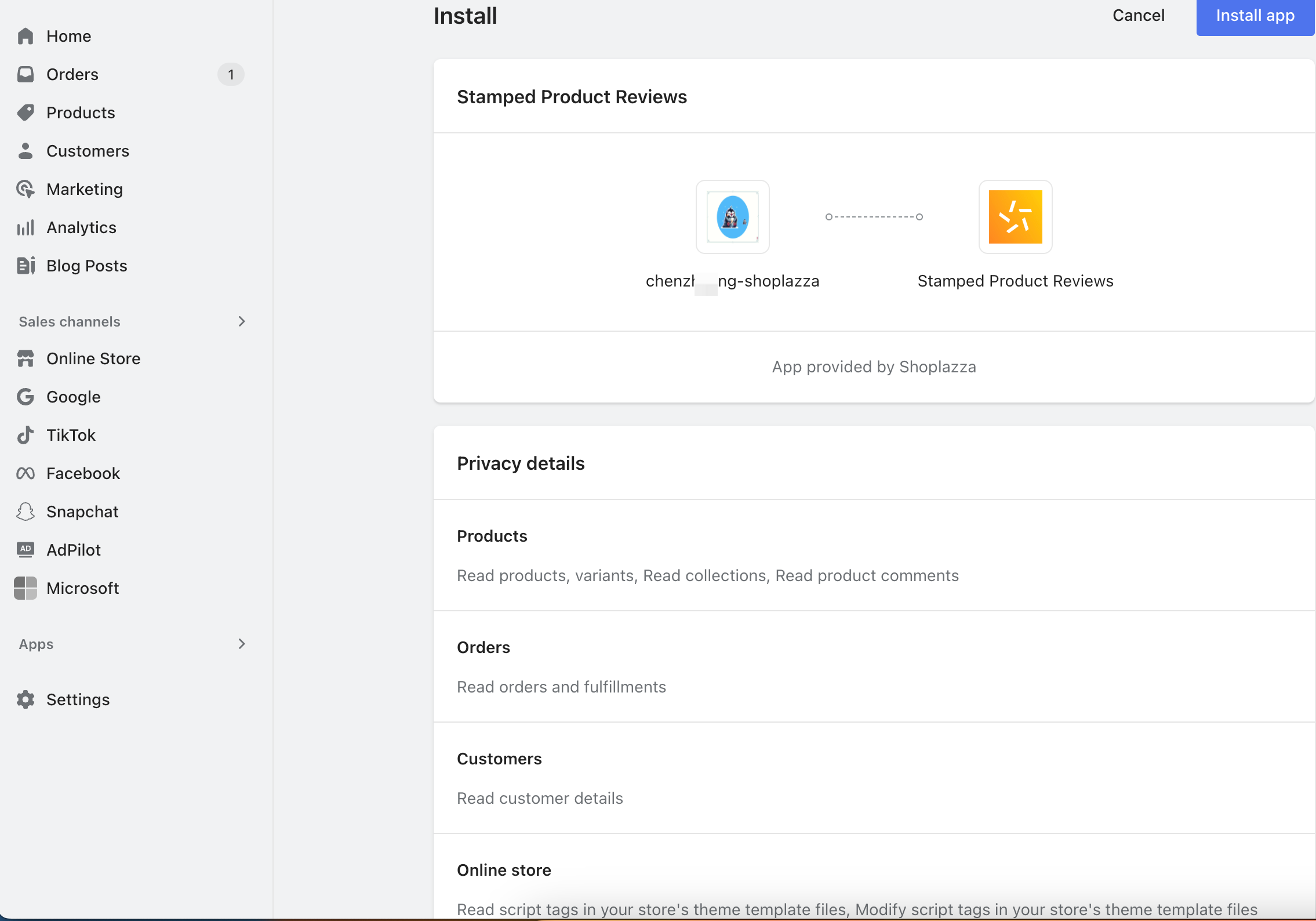
On the Shoplazza authorization page, the merchant will see a permission (scope) confirmation screen:
④ ⑤ Callback and Token Exchange
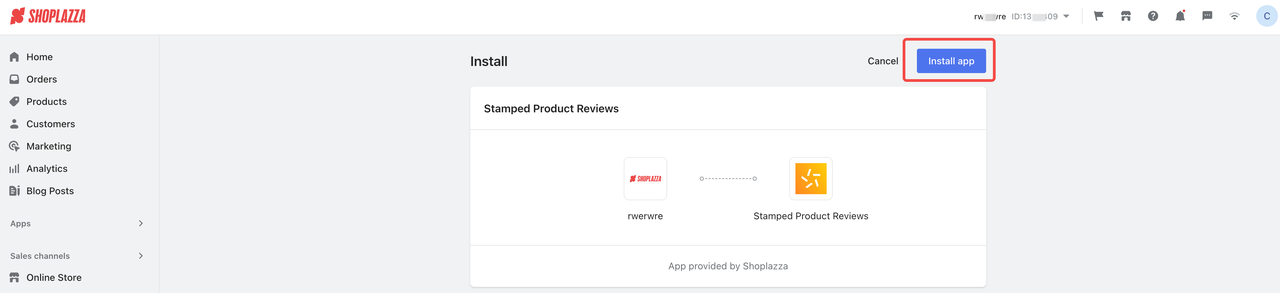
After the merchant clicks install and confirms on the authorization page:
After the merchant authorizes, Shoplazza calls back your redirect_uri:
https://your-app.example.com/auth/callback?code=<code>&shop=<shop>&state=<state>&hmac=<hmac>
Validation order:
- Validate
hmac - Validate that
statematches the one generated in step ② (anti-CSRF) - Validate that
shopis legitimate
After passing validation, exchange the code for an access_token with the store's token endpoint:
POST https://<shop>/admin/oauth/token
Content-Type: application/json

{
  "client_id": "<client_id>",
  "client_secret": "<client_secret>",
  "code": "<code>",
  "grant_type": "authorization_code",
  "redirect_uri": "<redirect_uri>"
}
Successful response:
{
  "token_type": "Bearer",
  "expires_at": 1550546245,
  "access_token": "<access_token>",
  "refresh_token": "<refresh_token>",
  "store_id": "2",
  "store_name": "xiong1889"
}
Field descriptions:
expires_at: Access token expiry timestamp (seconds)refresh_token: Used to refresh the access_tokenstore_id/store_name: Store identifiers
You can also use the Shoplazza OAuth SDK (Go) to exchange the token:
import (
  co "github.com/shoplazza-os/oauth-sdk-go"
  "github.com/shoplazza-os/oauth-sdk-go/shoplazza"
)

oauth := &co.Config{
                ClientID:     "s1Ip1WxpoEAHtPPzGiP2rK2Az-P07Nie7V97hRKigl4",
                ClientSecret: "{YOUR_CLIENT_SECRET}",
                Endpoint:     shoplazza.Endpoint,
                RedirectURI:  "https://3830-43-230-206-233.ngrok.io/oauth_sdk/redirect_uri/",
                Scopes:       []string{"read_shop"},
        }
token, err := oauth.Exchange(context.Background(),"xxx.myshoplaza.com", "code"))
Both the access_token and refresh_token are valid for 1 year. Before the access_token reaches its expires_at, use the refresh_token to obtain a new token (see "Refresh Access Token" below).
⑥ Persist and Make API Calls
Store (shop, access_token, refresh_token, expires_at) in your data store (database, Redis, etc.). When calling Open APIs, include the token in the Header:
GET https://<shop>/openapi/2022-01/customers HTTP/1.1
Access-Token: <access_token>
Refresh Access Token
When the access_token approaches its expires_at, use the refresh_token to get a new one:
POST https://<shop>/admin/oauth/token
Content-Type: application/json

{
  "client_id": "<client_id>",
  "client_secret": "<client_secret>",
  "refresh_token": "<refresh_token>",
  "grant_type": "refresh_token",
  "redirect_uri": "<redirect_uri>"
}
The response fields are the same as in the initial token exchange.
You can also use the Shoplazza OAuth SDK (Go) to refresh the token:
import (
  co "github.com/shoplazza-os/oauth-sdk-go"
  "github.com/shoplazza-os/oauth-sdk-go/shoplazza"
)

oauth := &co.Config{
                ClientID:     "s1Ip1WxpoEAHtPPzGiP2rK2Az-P07Nie7V97hRKigl4",
                ClientSecret: "{YOUR_CLIENT_SECRET}",
                Endpoint:     shoplazza.Endpoint,
                RedirectURI:  "https://3830-43-230-206-233.ngrok.io/oauth_sdk/redirect_uri/",
                Scopes:       []string{"read_shop"},
        }
token, err := oauth.RefreshToken(context.Background(), "xxx.myshoplaza.com", "refresh token")
Security Requirements
client_secretandaccess_tokenmust always be stored server-side, never sent to the browser- Every callback must validate
hmacandstate codeis one-time use; reusing it will fail- HTTPS must be used
- SSRF protection: Validate that the
shopparameter is a legitimate*.myshoplaza.comdomain - CSRF protection: Generate a random
statewhen initiating authorization, verify and consume it in the callback - Timing attack protection: Use
crypto.timingSafeEqualfor HMAC comparison
Token Storage Convention
The example stores access_token in SQLite using the store domain as the primary key (table shop_tokens: shop_domain as primary key, access_token, updated_time). When the store accesses the app again, it reads directly from the database without requiring re-authorization. For production, we recommend:
- Switching to a dedicated database like PostgreSQL or MySQL
- Configuring the database path via an environment variable (e.g.,
DB_PATH) to avoid relative path issues in different deployment environments - Using
require("sqlite3")instead of.verbose()to prevent extra debug logs from affecting performance
Best Practices
Environment Variable Management
- Development: Use a
.envfile - Production: Use your cloud platform's environment variable feature or a secret management service (e.g., AWS Secrets Manager, Azure Key Vault, Alibaba Cloud KMS)
- Never hardcode sensitive information in your project
- Add
.envto.gitignore
const CLIENT_SECRET = process.env.CLIENT_SECRET;
HMAC Verification
All requests from Shoplazza should validate the HMAC signature:
app.get("/auth", hmacValidator, (req, res) => {
  // Only requests that pass verification execute this code
});
Project Structure
For production projects, we recommend a front-end/back-end separated structure:
shoplazza-app-demo/
├── server/
│   ├── routes/
│   ├── utils/
│   ├── database/
│   └── index.js
├── src/
│   ├── components/
│   ├── pages/
│   └── main.js
├── dist/
├── package.json
└── .env
Reference Implementations
- Complete Node.js + Express example: Build an App with Node.js and Express
- SDKs for various languages: API Client Libraries
- List of scopes to request: Access Scopes