Processing a payment
Payment processing begins when Shoplazza sends an HTTP request to your payments app. Your app responds with a redirect URL or a payment result, depending on the payment model. After the payment is completed, your app must communicate the transaction result back to Shoplazza through the payment callback APIs.
How the payment app flow works
- The customer completes checkout and starts payment.
- Shoplazza sends a backend request to the payments app with the amount, currency, order, customer, and callback information.
- The payments app creates or processes the payment.
- For redirect or iframe payments, the payments app returns a payment page URL.
- Shoplazza redirects or embeds the payment page for the customer.
- The customer completes the payment with the payment provider.
- The payments app calls Shoplazza to complete the payment flow when required.
- The payments app sends the final payment result notification.
- Shoplazza updates the order payment status.
Both upstream and downstream requests must be idempotent. Use the payment id as the idempotency key.
Asynchronous communication
Payment processing relies on asynchronous HTTP communication between Shoplazza and the payments app. If Shoplazza does not acknowledge a callback with an HTTP 200 OK, the payments app must retry according to the retry policy.
Initiate the payment flow
The payment flow begins with a request from Shoplazza to the payment session URL configured for your payments app. The request body is sent as x-www-form-urlencoded and contains customer, order, billing, shipping, and callback information.
{
"id": "7eb3fefb-6b43-4400-b40a-a2a0531364ae",
"app_id": "db5fc9a6-2a64-11ec-8d3d-0242ac130003",
"account_id": "TIOnETZE",
"shoplazza_order_id": "2711-WFT50903",
"amount": "254.20",
"currency": "CAD",
"products": "[{\"name\":\"name\",\"quantity\":\"2\",\"unit_price\":\"20.00\",\"sku\":\"2023\",\"url\":\"http://a.bc/def\",\"desc\":\"desc\"}]",
"cancel_url": "https://developer.myshoplaza.com/checkout/3444-222GOA08029",
"complete_url": "https://developer.myshoplaza.com/openapi/2021-07/payments_apps/complete_callbacks?version=1.0",
"callback_url": "https://developer.myshoplaza.com/openapi/2021-07/payments_apps/notify_callbacks?version=1.0",
"customer_phone_number": "18202787518",
"customer_billing_address1": "Address detail 1",
"customer_billing_address2": "Address detail 2",
"customer_billing_last_name": "lv",
"customer_billing_first_name": "jianxing",
"customer_billing_province": "Liaoning",
"customer_billing_city": "Heishan County",
"customer_billing_postal_code": "123123",
"customer_billing_country_code": "CN",
"customer_billing_company": "shoplazza",
"customer_billing_state": "LN",
"customer_billing_phone": "13922235670",
"customer_shipping_address1": "Shipping address 1",
"customer_shipping_address2": "Shipping address 2",
"customer_shipping_last_name": "jiaxing",
"customer_shipping_first_name": "lv",
"customer_shipping_province": "Liaoning",
"customer_shipping_city": "Heishan County",
"customer_shipping_postal_code": "123123",
"customer_shipping_country_code": "CN",
"customer_shipping_company": "Shoplazza",
"customer_shipping_state": "LN",
"customer_shipping_phone": "13922235670",
"test": false,
"type": "sale",
"timestamp": "1697704968"
}
Request headers
| Header | Description |
|---|---|
Shoplazza-Shop-Domain | The permanent domain of the merchant's shop. |
Custom-Domain | The customer-facing domain used by the current order. |
Custom-Ip | The customer's IP address. |
User-Agent | The customer's browser user agent. |
Shoplazza-Shop-Id | The Shoplazza shop ID. |
Shoplazza-Request-Id | The unique request ID for troubleshooting. |
Shoplazza-Api-Version | The API version selected in the payments app configuration. |
Shoplazza-Hmac-Sha256 | HMAC signature for request verification. |
Customer-Cpf | Tax ID number when applicable. |
Request parameters
| Key | Required | Type | Description |
|---|---|---|---|
id | Yes | string | Payment ID. Use this as the idempotency key. |
app_id | Yes | string | Payments app ID. |
account_id | Yes | string | Merchant account ID in the payment provider system. |
shoplazza_order_id | Yes | string | Shoplazza order ID. The same order can only be paid once. |
amount | Yes | string | Order amount, formatted with two decimal places. |
currency | Yes | string | Three-letter ISO 4217 currency code. |
products | Yes | string | Serialized JSON string containing payment product information. |
cancel_url | Yes | string | URL to redirect the customer to when they cancel payment. |
complete_url | Yes | string | URL used for synchronous payment completion callback. |
callback_url | Yes | string | URL used for asynchronous payment result notification. |
customer_email | No | string | Customer email. |
customer_phone_number | No | string | Customer phone number. |
customer_billing_* | Varies | string | Billing address fields. |
customer_shipping_* | Varies | string | Shipping address fields. |
test | No | boolean | Whether the request is in test mode. |
type | Yes | string | Payment type, such as sale or card. |
cards | No | string | Serialized credit card data for direct credit card payments. |
timestamp | Yes | string | Request timestamp. |
Response
Shoplazza must receive an HTTP 2xx response for payment session creation to succeed. If the request fails, Shoplazza may retry the request. The response depends on the payment model.
For redirect or iframe payments, return a redirect URL:
{
  "redirect_url": "https://payment-gateway.example/pay"
}
For direct card payments without 3DS, return the payment result directly:
{
  "app_id": "12345",
  "payment_id": "7eb3fefb-6b43-4400-b40a-a2a0531364ae",
  "amount": "254.20",
  "currency": "CAD",
  "status": "paid",
  "transaction_no": "123456789",
  "type": "sale",
  "test": false,
  "timestamp": "2021-09-01T18:32:20Z"
}
For failures, return an error code and message:
{
  "code": "ERR-1234",
  "message": "Invalid amount"
}
Retry policy
If Shoplazza does not acknowledge your callback request with HTTP 200 OK, retry the request using an incremental strategy. The retry policy allows up to 18 retries within 24 hours.
| Parameter | Description | Value |
|---|---|---|
| Maximum retry attempts | Total retry attempts allowed if no HTTP 200 is received. | 18 retries |
| Initial retry delay | Delay before the first retry attempt. | 5 seconds |
| Exponential backoff factor | Subsequent retries occur at increasing intervals until acknowledgment or timeout. | See example |
Example retry intervals:
[0 seconds, 5 seconds, 10 seconds, 30 seconds, 45 seconds, 1 minute, 2 minutes, 5 minutes, 12 minutes, 38 minutes, 1 hour, 2 hours] + [4 hours] * 5
Redirect (Sale)
In the sale model, the customer is redirected from Shoplazza checkout to a third-party payment page to complete the transaction. Set type to sale in the payment session request.
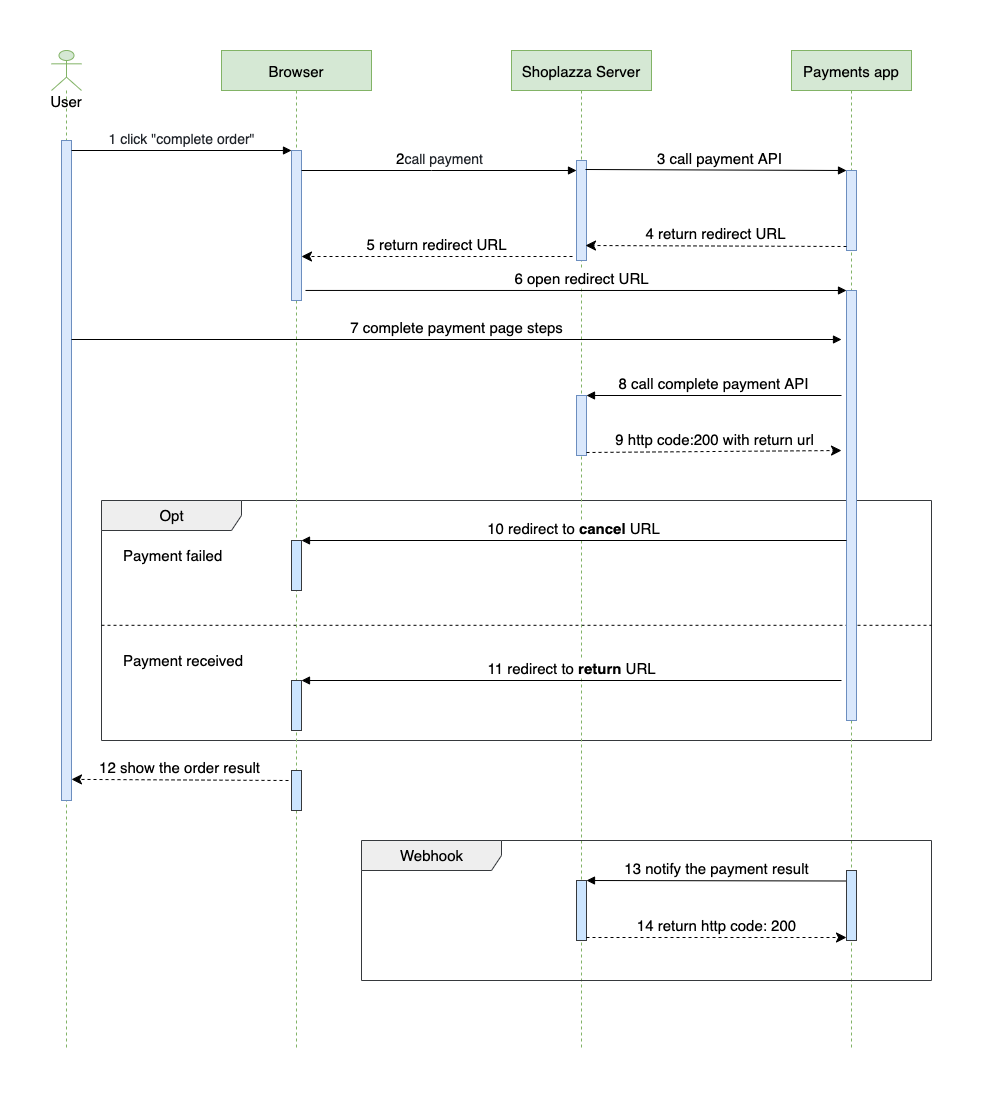
- The customer selects a payment method and clicks to complete payment.
- The browser sends the payment request to the Shoplazza server.
- The Shoplazza server forwards the payment request to the payments app server.
- The payments app server returns a redirect URL to the Shoplazza server.
- The Shoplazza server sends the redirect URL back to the browser.
- The browser redirects the customer to the payment gateway page.
- The customer submits payment details on the payment gateway page.
- The payments app server calls the Complete Payment API.
- Shoplazza returns a redirect URL to the payments app server.
- If payment fails, the customer is redirected to the
cancel_urlprovided in the payment request. - If payment succeeds, the customer is redirected to the
complete_urlreturned by Shoplazza. - The customer is directed to the order payment result page.
- The payments app server sends the final payment result notification to the callback URL.
- Shoplazza acknowledges receipt of the notification with HTTP
200.
Iframe
The iframe model embeds a third-party payment window within the Shoplazza checkout page. The payment session request uses the same structure as the sale model. Shoplazza loads the returned redirect_url inside the iframe or pop-up container.
Iframe dimensions:
- Width and height are specified in pixels, without units.
- Minimum width is
300px. - Minimum height is
200px. - Maximum width and height must not exceed screen dimensions.
- Values exceeding screen size default to
80vw x 80vh.
Direct card
The card model lets customers enter credit card details directly on the Shoplazza checkout page. This model requires PCI-DSS compliance and must support 3DS verification where required. Include serialized credit card information in the cards field.
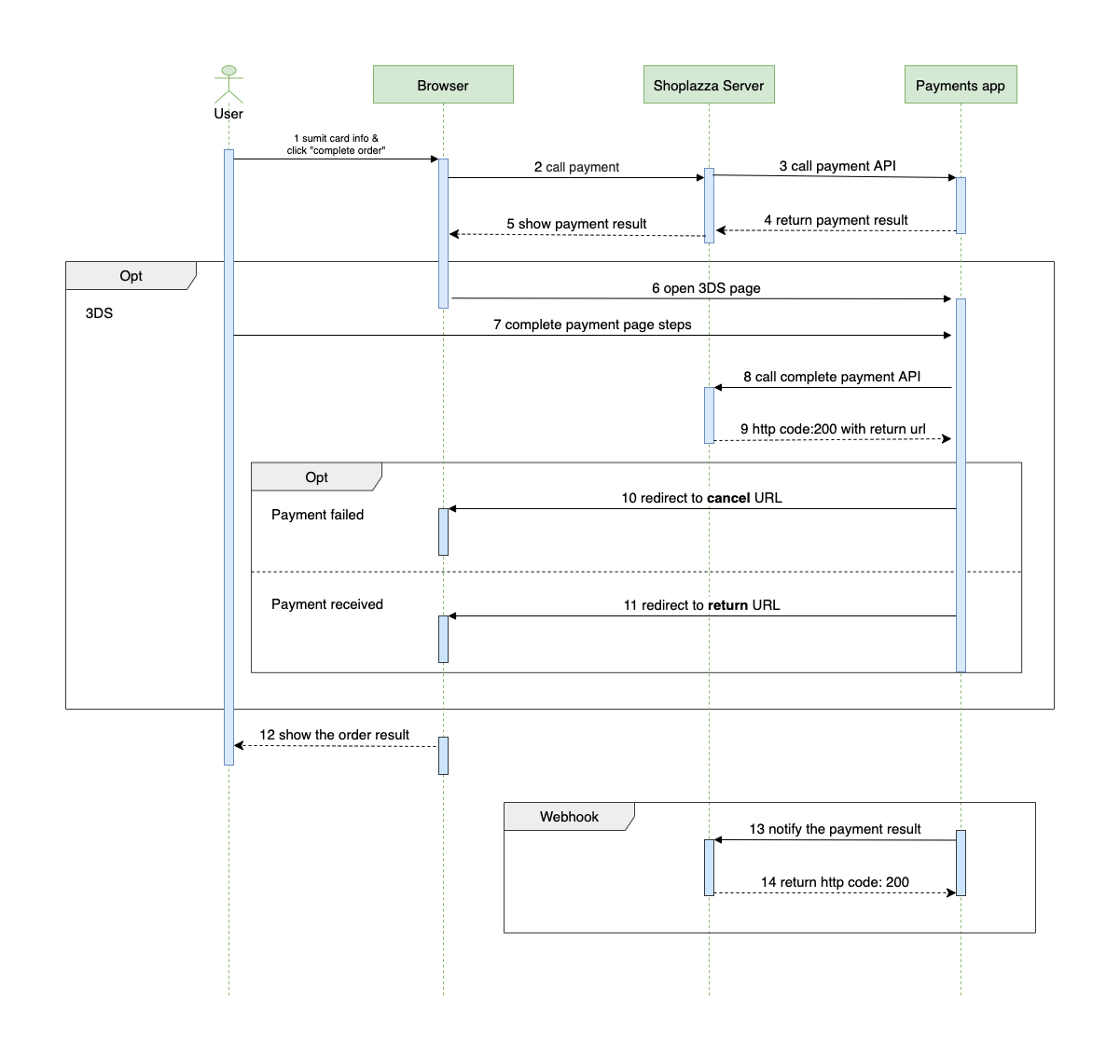
- The customer enters credit card information and clicks to complete payment.
- The browser sends the payment request to the Shoplazza server.
- The Shoplazza server forwards the payment request to the payments app server.
- The payments app server returns the payment status to the Shoplazza server.
- The Shoplazza server sends the payment result back to the browser.
- If 3DS verification is required, the browser redirects the customer to the 3DS verification page. Otherwise, the flow continues to the result page.
- The customer submits verification details on the 3DS page.
- The payments app server calls the Complete Payment API.
- Shoplazza returns a redirect URL to the payments app server.
- If payment fails, the customer is redirected to the
cancel_urlprovided in the payment request. - If payment succeeds, the customer is redirected to the
complete_urlreturned by Shoplazza. - The customer is directed to the order payment result page.
- The payments app server sends the final payment result notification to the callback URL.
- Shoplazza acknowledges receipt of the notification with HTTP
200.
| Key | Required | Type | Description |
|---|---|---|---|
cards | No | string | Serialized JSON object containing credit card information. |
cards.first_name | No | string | First name on the card. |
cards.last_name | No | string | Last name on the card. |
cards.card_number | No | string | Credit card number. |
cards.expire_year | No | string | Two-digit expiration year. |
cards.expire_month | No | string | Two-digit expiration month. |
cards.card_cvv | No | string | CVV, 3 or 4 digits. |
If 3DS verification is required, return a redirect URL for verification:
{
  "redirect_url": "https://3ds-verification.example"
}