Section schema
Section 支持 section 专用的 Liquid tag {% schema %}。通过该 tag,您可以定义 section 的各种属性,例如 section 名称、section block 以及用于主题编辑器自定义的设置。
Schema
每个 section 只能有一个 {% schema %} tag,其中只能包含使用内容中所列属性的有效 JSON。该 tag 可以放置在 section 文件的任意位置,但不能嵌套在其他 Liquid tag 内。
🚧 注意
如果有多个
{% schema %}tag,或将其放置在其他 Liquid tag 内,将会导致错误。
以下是一个有效 section schema 的示例。各属性的详细信息请参考内容。
{
  "name": "product",
  "templates": [
    "product"
  ],
  "limit": 1,
  "max_blocks": 5,
  "settings": [
    {
      "type": "select",
      "id": "gallery_style",
      "label": {
        "en-US": "Gallery style",
        "zh-CN": "图集风格"
      },
      "default": "carousel",
      "options": [
        {
          "value": "carousel",
          "label": {
            "en-US": "Carousel",
            "zh-CN": "轮播"
          }
        },
        {
          "value": "grid",
          "label": {
            "en-US": "Grid",
            "zh-CN": "网格"
          }
        }
      ]
    },
    {
      "type": "select",
      "id": "force_image_size",
      "label": {
        "en-US": "Force image size",
        "zh-CN": "强制图片尺寸"
      },
      "default": "natural",
      "options": [
        {
          "value": "natural",
          "label": {
            "en-US": "Natural",
            "zh-CN": "原尺寸"
          }
        },
        {
          "value": "100%",
          "label": {
            "en-US": "Square (1:1)",
            "zh-CN": "方形(1:1)"
          }
        },
        {
          "value": "150%",
          "label": {
            "en-US": "Portrait (2:3)",
            "zh-CN": "肖像画(2:3)"
          }
        },
        {
          "value": "75%",
          "label": {
            "en-US": "Landscape (4:3)",
            "zh-CN": "景观画(4:3)"
          }
        }
      ]
    }
  ],
  "blocks": [
    {
      "type": "@app"
    },
    {
      "type": "title",
      "name": {
        "en-US": "Title",
        "zh-CN": "标题"
      },
      "limit": 1,
      "settings": []
    },
    {
      "type": "subtitle",
      "name": {
        "en-US": "Subtitle",
        "zh-CN": "副标题"
      },
      "limit": 1,
      "settings": []
    }
  ],
  "presets": [
    {
      "name": "product",
      "cname": {
        "en-US": "Product detail",
        "zh-CN": "商品详情"
      },
      "category": {
        "en-US": "Page",
        "zh-CN": "页面"
      },
      "display": true,
      "blocks": [
        {
          "type": "title",
          "settings": {}
        },
        {
          "type": "subtitle",
          "settings": {}
        }
      ]
    }
  ]
}
内容
{% schema %} 的内容可以包含以下属性:
📘 说明
{% schema %}tag 是一个 Liquid tag,但它不会输出其内容,也不会渲染其中包含的 Liquid。
您还应该考虑使您的 section 与 app block 兼容。App block 允许应用开发者创建 block,让商家无需直接编辑 theme 代码即可将应用内容添加到 theme 中。
name
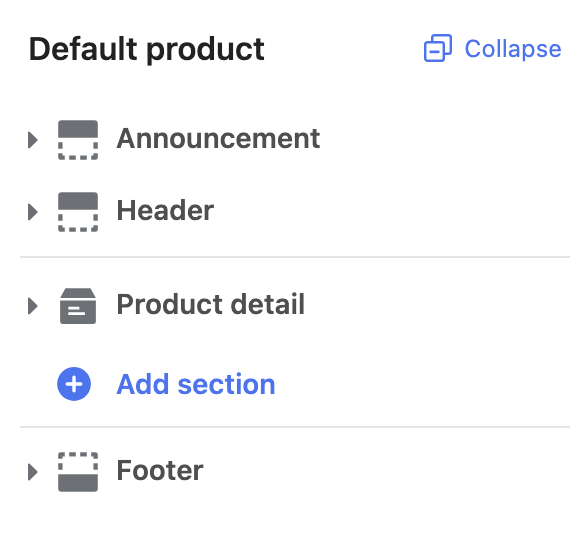
name 属性决定在主题编辑器中显示的 section 标题。例如,以下 schema 产生如下输出:
{% schema %}
{
  "name": "product",
  "presets": [
  	{
      "name": "product",
      "cname": {
        "en-US": "Product detail",
        "zh-CN": "商品详情"
      },
      "category": {
        "en-US": "Page",
        "zh-CN": "页面"
      }
    }
  ]
}
{% endschema %}
输出:
🚧 注意
name属性和 preset 的 name 属性值必须与文件名保持一致。
class
Shoplazza 渲染 section 时,会将其包裹在一个带有 shoplazza-section class 的 HTML 元素中。您可以通过 class 属性添加额外的 class:
{% schema %}
{
  "name": "product",
  "class": "page-container",
  "presets": [
  	{
      "name": "product",
      "cname": {
        "en-US": "Product detail",
        "zh-CN": "商品详情"
      },
      "category": {
        "en-US": "Page",
        "zh-CN": "页面"
      }
    }
  ]
}
{% endschema %}
<div class="shoplaza-section page-container" id="shoplaza-section-1651799308132" data-section-id="1651799308132" data-section-type="product" data-section-style>
  <!-- section 内容输出 -->
</div>
templates
允许使用该 section 的 template 页面类型列表。
{% schema %}
{
  "name": "product",
  "class": "page-container",
  "templates": ["product"],
  "presets": [
  	{
      "name": "product",
      "cname": {
        "en-US": "Product detail",
        "zh-CN": "商品详情"
      },
      "category": {
        "en-US": "Page",
        "zh-CN": "页面"
      }
    }
  ]
}
{% endschema %}
此 product section 只能添加到 product template 页面中。
limit
默认情况下,section 可以被添加到 template 中的次数没有限制。您可以通过 limit 属性指定限制:
{% schema %}
{
  "name": "product",
  "class": "page-container",
  "templates": ["product"],
  "limit": 1,
  "presets": [
  	{
      "name": "product",
      "cname": {
        "en-US": "Product detail",
        "zh-CN": "商品详情"
      },
      "category": {
        "en-US": "Page",
        "zh-CN": "页面"
      }
    }
  ]
}
{% endschema %}
settings
您可以使用 settings 对象创建 section 专属设置,允许商家自定义 section:
{% schema %}
{
  "name": "product",
  "class": "page-container",
  "templates": ["product"],
  "limit": 1,
  "settings": [
    {
      "type": "text",
      "id": "heading",
      "label": {
        "en-US": "Title",
        "zh-CN": "自定义标题"
      },
      "default": "Choose edition"
    }
  ],
  "presets": [
    {
      "name": "product",
      "cname": {
        "en-US": "Product detail",
        "zh-CN": "商品详情"
      },
      "category": {
        "en-US": "Page",
        "zh-CN": "页面"
      }
    }
  ]
}
{% endschema %}
🚧 注意
每个 section 内的所有设置 ID 必须唯一。在 section 内存在重复 ID 将导致错误。
访问 section 设置
Section 设置可以通过 section 对象访问。更多信息请参考访问设置。
blocks
您可以为 section 创建 block。Block 是可复用的内容模块,可以在 section 内添加、删除和重新排列。
Block 具有以下属性:
| 属性 | 描述 | 是否必填 |
|---|---|---|
type | block 类型。这是一个自由格式的字符串,可用作标识符。您可以通过 block 对象的 type 属性访问该值。 | 是 |
name | block 名称将在主题编辑器中显示为 block 标题。 | 是 |
limit | 该类型 block 可使用的数量限制。 | 否 |
settings | 您希望为该 block 配置的任何输入或 sidebar 设置。 | 否 |
以下是在 section 中包含 block 的示例:
{% schema %}
{
  "name": "product",
  "class": "page-container",
  "templates": ["product"],
  "limit": 1,
  "settings": [
    {
      "type": "text",
      "id": "heading",
      "label": {
        "en-US": "Title",
        "zh-CN": "自定义标题"
      },
      "default": "Choose edition"
    }
  ],
  "blocks": [
    {
      "type": "title",
      "limit": 1,
      "name": {
        "en-US": "Title",
        "zh-CN": "标题"
      },
      "settings": []
    }
  ],
  "presets": [
    {
      "name": "product",
      "cname": {
        "en-US": "Product detail",
        "zh-CN": "商品详情"
      },
      "category": {
        "en-US": "Page",
        "zh-CN": "页面"
      }
    }
  ]
}
{% endschema %}
🚧 注意
每个 section 内的所有 block 名称和类型必须唯一,每个 block 内的所有设置 ID 也必须唯一。存在重复将导致错误。
访问 block 设置
Block 设置可以通过 block 对象访问。更多信息请参考访问设置。
渲染 block
您可以通过遍历 section 对象的 blocks 属性来渲染 section 的 block:
{% for block in section.blocks %}
  {% case block.type %}
    {% when 'title' %}
      <h2 {{ block.shoplaza_attributes }}>{{ product.title }}</h2>
  {% endcase %}
{% endfor %}
在上面的示例中,每个 block 的内容包含在一个父容器内,该容器添加了 {{ block.shoplaza_attributes }} 作为属性。Shoplazza 的主题编辑器通过该属性在其 JavaScript API 中识别各个 block。
max_blocks
默认情况下,block 可以被添加到 section 中的次数没有限制。您可以通过 max_blocks 属性指定限制:
{% schema %}
{
  "name": "product",
  "class": "page-container",
  "templates": ["product"],
  "limit": 1,
  "max_blocks": 5,
  "settings": [
    {
      "type": "text",
      "id": "heading",
      "label": {
        "en-US": "Title",
        "zh-CN": "自定义标题"
      },
      "default": "Choose edition"
    }
  ],
  "blocks": [
    {
      "type": "title",
      "limit": 1,
      "name": {
        "en-US": "Title",
        "zh-CN": "标题"
      },
      "settings": []
    }
  ],
  "presets": [
    {
      "name": "product",
      "cname": {
        "en-US": "Product detail",
        "zh-CN": "商品详情"
      },
      "category": {
        "en-US": "Page",
        "zh-CN": "页面"
      }
    }
  ]
}
{% endschema %}
presets
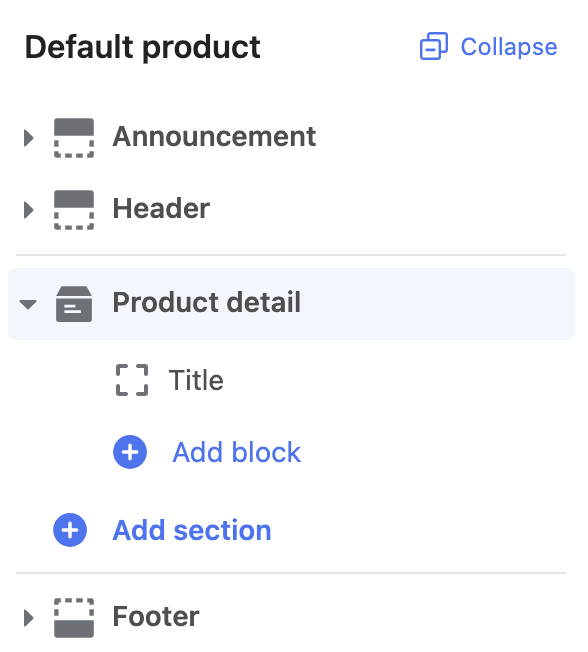
Preset 是 section 的默认配置,让用户可以通过主题编辑器轻松将 section 添加到 Liquid template 中。
Preset 具有以下属性:
| 属性 | 描述 | 是否必填 |
|---|---|---|
name | preset 名称与文件名相同。 | 是 |
cname | preset 显示名称将显示在主题编辑器的添加 section 部分。 | 是 |
category | preset 的分类。 | 是 |
display | 可以指定 section 是否在添加 section 中可见。 | 否 |
blocks | 您希望包含的默认 block 列表。每个条目应为包含 type 和 settings 属性的对象。type 属性值应反映要包含的 block 类型,settings 对象的格式与上方 settings 属性相同。 | 否 |
以下是在 section 中包含 preset 的示例:
{% schema %}
{
  "name": "product",
  "class": "page-container",
  "templates": ["product"],
  "limit": 1,
  "max_blocks": 5,
  "settings": [
    {
      "type": "text",
      "id": "heading",
      "label": {
        "en-US": "Title",
        "zh-CN": "自定义标题"
      },
      "default": "Choose edition"
    }
  ],
  "blocks": [
    {
      "type": "title",
      "limit": 1,
      "name": {
        "en-US": "Title",
        "zh-CN": "标题"
      },
      "settings": []
    }
  ],
  "presets": [
    {
      "name": "product",
      "cname": {
        "en-US": "Product detail",
        "zh-CN": "商品详情"
      },
      "category": {
        "en-US": "Page",
        "zh-CN": "页面"
      },
      "display": true,
      "blocks": [
        {
          "type": "title",
          "settings": {}
        }
      ]
    }
  ]
}
{% endschema %}
输出:
App block
如果您的 section 属于 Liquid template,则应支持 @app 类型的 block。App block 允许应用开发者创建 block,让商家无需直接编辑 theme 代码即可将应用内容添加到 theme 中。