API 使用方式
RESTful API
获取应用的 Access Token 后,您可以构建 RESTful API 请求来访问 Shoplazza 的 API。请求 URL 必须包含版本号以正确识别所需的 API 版本,格式如下:
RESTful API URL: https://{shopdomain}.myshoplaza.com/openapi/{ version }/{ endpoint }
例如,以下 URL 调用 2025-06 版本:
RESTful API URL: https://{shopdomain}.myshoplaza.com/openapi/2025-06/articles
关于 API 版本如何命名、发布与下线,参见 API 版本策略。
备注
- 所有 endpoint 仅可通过 HTTPS 访问。
- 基础域名格式为 https://{shopdomain}.myshoplaza.com,其中 {shopdomain} 代表您店铺的唯一域名。
RESTful API 调用示例
以下 curl 请求通过 Article API 的 GET /openapi/2025-06/articles endpoint 获取信息。请将 {shopdomain} 替换为您店铺的域名,{token} 替换为您在鉴权部分生成的 access token。
请求:
curl -X GET \
  https://{shopdomain}.myshoplaza.com/openapi/2025-06/articles/id \
  -H 'Content-Type: application/json' \
  -H 'Access-Token: {token}'
Response 示例:
json
{
  "code": "string",
  "message": "string",
  "data": {
    "article": {
      "id": "string",
      "title": "string",
      "excerpt": "string",
      "content": "string",
      "image": {
        "src": "string",
        "width": 0,
        "height": 0,
        "path": "string"
      },
      "published": true,
      "handle": "string",
      "seo_title": "string",
      "seo_description": "string",
      "seo_keywords": [
        "string"
      ],
      "author": "string",
      "published_at": "string",
      "blog_ids": [
        "string"
      ],
      "created_at": "string",
      "updated_at": "string"
    }
  }
}
如何获取资源 ID
许多 endpoint 的路径中需要传入资源 ID。有两种简便方式获取对象的 ID。
通过 URL 或网页
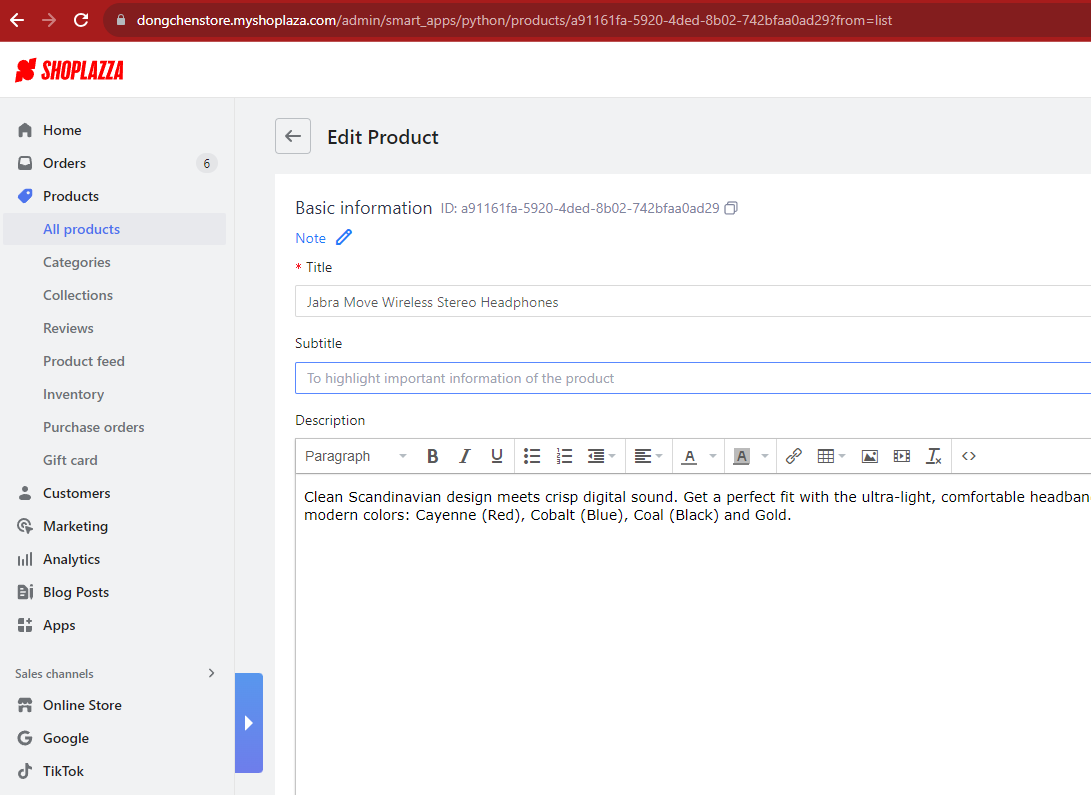
要获取商品 ID,进入所有商品页面,打开商品详情页,在以下两处都能看到 ID:
- "基本信息"部分旁边。
- 浏览器地址栏中商品 URL 内。
订单、客户等其他实体同理——在实体详情页的 URL 或详情页面中找到 ID。
通过列表 API
任意列表接口都会返回每个对象的 id。例如商品列表 API 会返回带 ID 的商品:
json
{
  "products": [
    {
      "id": "c1d5b2a3-fab1-4e26-8582-75d3b2677042",
      "title": "aasd",
      "handle": "asd-bkpq",
      ...
    }
  ]
}
此方法同样适用于客户、订单等其他资源。