# Section schema
> The schema tag defines a Shoplazza Theme section's name, settings, blocks, presets, and template restrictions. See every supported attribute and the rules for using it.
Sections support the section-specific Liquid tag `{% schema %}`. This tag allows you to define various attributes of a section, such as the section name, any section blocks, and settings to allow for theme editor customization options.
## Schema
Each section can have only a single `{% schema %}` tag, which must contain only valid JSON using the attributes listed in [Content](/docs/theme/architecture/sections/section-schema#content). The tag can be placed anywhere within the section file, but it can’t be nested inside another Liquid tag.
**warning**
Having more than one `{% schema %}` tag, or placing it inside another Liquid tag, will result in an error.
The following is an example of a valid section schema. For details on each attribute, refer to [Content](/docs/theme/architecture/sections/section-schema#content).
**/sections/product_detail.liquid**
```json
{
"name": "product",
"templates": [
"product"
],
"limit": 1,
"max_blocks": 5,
"settings": [
{
"type": "select",
"id": "gallery_style",
"label": {
"en-US": "Gallery style",
"zh-CN": "图集风格"
},
"default": "carousel",
"options": [
{
"value": "carousel",
"label": {
"en-US": "Carousel",
"zh-CN": "轮播"
}
},
{
"value": "grid",
"label": {
"en-US": "Grid",
"zh-CN": "网格"
}
}
]
},
{
"type": "select",
"id": "force_image_size",
"label": {
"en-US": "Force image size",
"zh-CN": "强制图片尺寸"
},
"default": "natural",
"options": [
{
"value": "natural",
"label": {
"en-US": "Natural",
"zh-CN": "原尺寸"
}
},
{
"value": "100%",
"label": {
"en-US": "Square (1:1)",
"zh-CN": "方形(1:1)"
}
},
{
"value": "150%",
"label": {
"en-US": "Portrait (2:3)",
"zh-CN": "肖像画(2:3)"
}
},
{
"value": "75%",
"label": {
"en-US": "Landscape (4:3)",
"zh-CN": "景观画(4:3)"
}
}
]
}
],
"blocks": [
{
"type": "@app"
},
{
"type": "title",
"name": {
"en-US": "Title",
"zh-CN": "标题"
},
"limit": 1,
"settings": []
},
{
"type": "subtitle",
"name": {
"en-US": "Subtitle",
"zh-CN": "副标题"
},
"limit": 1,
"settings": []
}
],
"presets": [
{
"name": "product",
"cname": {
"en-US": "Product detail",
"zh-CN": "商品详情"
},
"category": {
"en-US": "Page",
"zh-CN": "页面"
},
"display": true,
"blocks": [
{
"type": "title",
"settings": {}
},
{
"type": "subtitle",
"settings": {}
}
]
}
]
}
```
## Content
The content of `{% schema %}` can include the following attributes:
* [name](#name)
* [class](#class)
* [templates](#templates)
* [limit](#limit)
* [settings](#settings)
* [blocks](#blocks)
* [max_blocks](#max_blocks)
* [presets](#presets)
**note**
The `{% schema %}` tag is a Liquid tag. However, it doesn’t output its contents, or render any Liquid included inside it.
You should also consider making your section compatible with [app blocks](/docs/theme/architecture/sections/app-blocks-for-themes). App blocks allow app developers to create blocks for merchants to add app content to their theme without having to directly edit their theme code.
### name
The `name` attribute determines the section title that is shown in the theme editor. For example, the following schema returns the following output:
**/sections/product.liquid**
```liquid
{% schema %}
{
"name": "product",
"presets": [
{
"name": "product",
"cname": {
"en-US": "Product detail",
"zh-CN": "商品详情"
},
"category": {
"en-US": "Page",
"zh-CN": "页面"
}
}
]
}
{% endschema %}
```
**Output:**
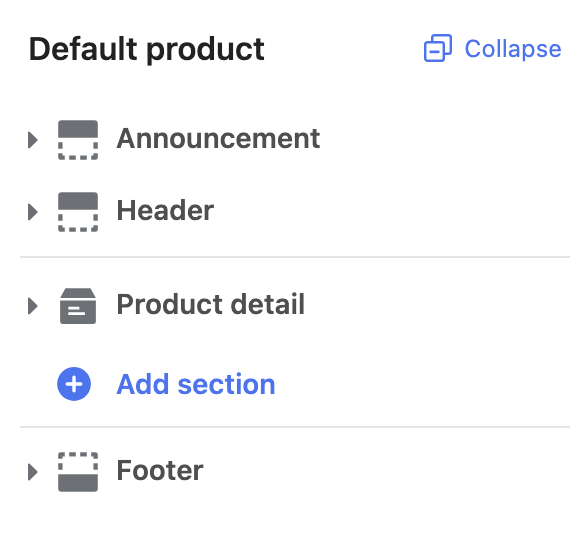
**warning**
The `name` and the presets's name attribute must be the same value as the filename.
### class
When Shoplazza renders a section, it’s wrapped in an HTML element with a class of Shoplazza-section. You can add to that class with the class attribute:
**/sections/product.liquid**
```liquid
{% schema %}
{
"name": "product",
"class": "page-container",
"presets": [
{
"name": "product",
"cname": {
"en-US": "Product detail",
"zh-CN": "商品详情"
},
"category": {
"en-US": "Page",
"zh-CN": "页面"
}
}
]
}
{% endschema %}
```
**Output**
```html
```
### templates
A list of the template page types where the section can be used.
**/sections/product.liquid**
```liquid
{% schema %}
{
"name": "product",
"class": "page-container",
"templates": ["product"],
"presets": [
{
"name": "product",
"cname": {
"en-US": "Product detail",
"zh-CN": "商品详情"
},
"category": {
"en-US": "Page",
"zh-CN": "页面"
}
}
]
}
{% endschema %}
```
This `product` section only is added in the `product` template page.
### limit
By default, there's no limit to how many times a section can be added to a template. You can specify a limit with the `limit` attribute:
**/sections/product.liquid**
```liquid
{% schema %}
{
"name": "product",
"class": "page-container",
"templates": ["product"],
"limit": 1,
"presets": [
{
"name": "product",
"cname": {
"en-US": "Product detail",
"zh-CN": "商品详情"
},
"category": {
"en-US": "Page",
"zh-CN": "页面"
}
}
]
}
{% endschema %}
```
### settings
You can create section-specific [settings](/docs/theme/architecture/settings/input-settings) to allow merchants to customize the section with the `settings` object:
**/sections/product.liquid**
```liquid
{% schema %}
{
"name": "product",
"class": "page-container",
"templates": ["product"],
"limit": 1,
"settings": [
{
"type": "text",
"id": "heading",
"label": {
"en-US": "Title",
"zh-CN": "自定义标题"
},
"default": "Choose edition"
}
],
"presets": [
{
"name": "product",
"cname": {
"en-US": "Product detail",
"zh-CN": "商品详情"
},
"category": {
"en-US": "Page",
"zh-CN": "页面"
}
}
]
}
{% endschema %}
```
**warning**
All section setting IDs must be unique within each section. Having duplicate IDs within a section will result in an error.
#### Access section settings
Section settings can be accessed through the [section object](/docs/theme/references/liquid/objects/sections). Refer to [Access settings](/docs/theme/architecture/settings/overview#access-settings) to learn more.
### blocks
You can create blocks for a section. Blocks are reusable modules of content that can be added, removed, and reordered within a section.
Blocks have the following attributes:
| Attribute | Description | Required |
| --- | --- | --- |
| `type` | The block type. This is a free-form string that you can use as an identifier. You can access this value through the `type` attribute of the [block object](/docs/theme/references/liquid/objects/blocks). | Yes |
| `name` | The block name will show as the block title in the theme editor. | Yes |
| `limit` | The number of blocks of this type that can be used. | No |
| `settings` | Any [input](/docs/theme/architecture/settings/input-settings) or [sidebar](/docs/theme/architecture/settings/sidebar-settings) settings that you want for the block. | No |
The following is an example of including blocks in a section:
**/sections/product.liquid**
```liquid
{% schema %}
{
"name": "product",
"class": "page-container",
"templates": ["product"],
"limit": 1,
"settings": [
{
"type": "text",
"id": "heading",
"label": {
"en-US": "Title",
"zh-CN": "自定义标题"
},
"default": "Choose edition"
}
],
"blocks": [
{
"type": "title",
"limit": 1,
"name": {
"en-US": "Title",
"zh-CN": "标题"
},
"settings": []
}
],
"presets": [
{
"name": "product",
"cname": {
"en-US": "Product detail",
"zh-CN": "商品详情"
},
"category": {
"en-US": "Page",
"zh-CN": "页面"
}
}
]
}
{% endschema %}
```
**warning**
All block names and types must be unique within each section, and all setting IDs must be unique within each block. Having duplicates will result in an error.
#### Access block settings
Block settings can be accessed through the [block object](/docs/theme/references/liquid/objects/blocks). Refer to [Access settings](/docs/theme/architecture/settings/overview#access-settings) to learn more.
#### Render blocks
You can render a section's blocks by looping over the `blocks` attribute of the [section object](/docs/theme/references/liquid/objects/sections):
**Example**
```liquid
{% for block in section.blocks %}
{% case block.type %}
{% when 'title' %}
{{ product.title }}
{% endcase %}
{% endfor %}
```
In the example above, each block's content is included inside a parent container, and that container has `{{ block.shoplaza_attributes }}` added as an attribute. Shoplazza's theme editor uses that attribute to identify blocks in its JavaScript API.
### max_blocks
By default, there's no limit to how many times a block can be added to a section. You can specify a limit with the `max_blocks` attribute:
**/sections/product.liquid**
```liquid
{% schema %}
{
"name": "product",
"class": "page-container",
"templates": ["product"],
"limit": 1,
"max_blocks": 5,
"settings": [
{
"type": "text",
"id": "heading",
"label": {
"en-US": "Title",
"zh-CN": "自定义标题"
},
"default": "Choose edition"
}
],
"blocks": [
{
"type": "title",
"limit": 1,
"name": {
"en-US": "Title",
"zh-CN": "标题"
},
"settings": []
}
],
"presets": [
{
"name": "product",
"cname": {
"en-US": "Product detail",
"zh-CN": "商品详情"
},
"category": {
"en-US": "Page",
"zh-CN": "页面"
}
}
]
}
{% endschema %}
```
### presets
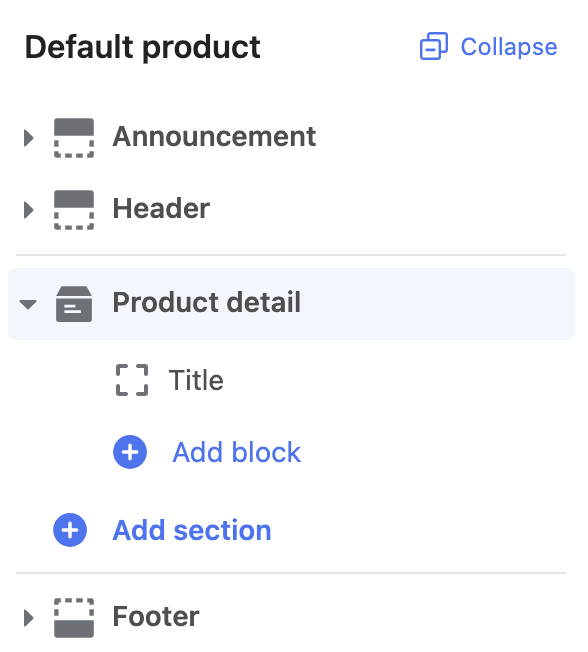
Presets are default configurations of sections that enable users to easily add a section to a [Liquid template](/docs/theme/architecture/templates/liquid-templates) through the theme editor.
Presets have the following attributes:
| Attribute | Description | Required |
| --- | --- | --- |
| `name` | The preset name is the same as the filename. | Yes |
| `cname` | The preset display name will show in the **Add section** portion of the theme editor. | Yes |
| `category` | The preset category. | Yes |
| `display` | You can specify whether a section is visible in the **Add section**. | No |
| `blocks` | A list of default blocks that you might want to include. Each entry should be an object with attributes of `type` and `settings`. The `type` attribute value should reflect the type of block that you want to include and the `settings` object should be in the same format as the `settings` attribute above. | No |
The following is an example of including presets in a section:
**/sections/product.liquid**
```liquid
{% schema %}
{
"name": "product",
"class": "page-container",
"templates": ["product"],
"limit": 1,
"max_blocks": 5,
"settings": [
{
"type": "text",
"id": "heading",
"label": {
"en-US": "Title",
"zh-CN": "自定义标题"
},
"default": "Choose edition"
}
],
"blocks": [
{
"type": "title",
"limit": 1,
"name": {
"en-US": "Title",
"zh-CN": "标题"
},
"settings": []
}
],
"presets": [
{
"name": "product",
"cname": {
"en-US": "Product detail",
"zh-CN": "商品详情"
},
"category": {
"en-US": "Page",
"zh-CN": "页面"
},
"display": true,
"blocks": [
{
"type": "title",
"settings": {}
}
]
}
]
}
{% endschema %}
```
**Output:**
### App blocks
If your section is part of a [Liquid templates](/docs/theme/architecture/templates/liquid-templates), then you should support blocks of type `@app`. [App blocks](/docs/theme/architecture/sections/app-blocks-for-themes) allow app developers to create blocks for merchants to add app content to their theme without having to directly edit theme code.